


Key Takeaways
- An AI social media scheduler combines content creation and automated posting in one workflow, so you build a month of content in hours instead of weeks.
- Batching content in one focused session saves most teams 4 to 6 hours every week, which adds up to over 200 hours a year.
- Posting consistently is what moves the needle on most platforms. Buffer's 2026 data found that posting in 5 or more weeks out of 26 delivers up to 340% more engagement than sporadic posting.
- The best workflow is simple: pick your themes, batch your ideas, draft with AI, generate visuals, then schedule everything in one place.
- HeyOz combines AI content creation and scheduling into one tool, so you do not have to juggle a writer, a designer, and a scheduler separately.
Introduction
A skincare founder told me she used to spend her Sundays writing captions, hunting for product photos, and trying to remember which platform she had not posted to that week. Now she sits down once a month, generates 30 days of content with AI, schedules it, and goes back to running her business. The whole thing takes her one afternoon.
That is the shift this guide walks you through. Not theory. The actual steps.
Step 1: Pick Your Goal, Audience, and Platforms First
Before you open any tool, get three things on paper.
What is your goal this month? Pick one. More website visits. More signups. Push a specific product. Build awareness in a new audience. If you cannot name it, the rest of the plan will drift.
Who are you talking to? Be specific. "DTC founders running their own ads" is better than "small business owners." The narrower you go, the sharper your content gets.
Which platforms matter right now? Pick one to three. Spreading yourself across six channels is how brands burn out and post nothing well.
AI is good at the heavy lifting, not the strategy. Feed it weak inputs and you get weak outputs back.
Step 2: Build Your Content Buckets and Calendar
Random ideas lead to random results. Themes lead to consistency.
Most brands run four to five content buckets. Educational posts. Authority and proof, like customer wins or behind-the-scenes. Engagement posts that invite a reply. Promotional posts that push your offer. Storytelling posts that build connections.
Decide your posting cadence per platform. Hootsuite's data suggests posting 3 to 5 times per week on Instagram, 1 to 2 times per day on Facebook, and 3 to 5 times per week on TikTok. Pick a number you can actually sustain.
Lay out the next 30 days on a simple grid. Slot a bucket into each posting day. Monday educational. Wednesday story. Friday promo. Repeat. The grid is your skeleton. Now you fill it.
Step 3: Use AI to Generate Ideas, Captions, and Visuals in Batches
This is where the afternoon gets short.
Batch your ideas first. Ask AI for 10 to 15 ideas per bucket. Give it your audience, your offer, and your tone. Cut the weak ones. Drop the rest into your calendar.
Batch your captions next. Group all the educational posts together. Feed AI five ideas at once and ask for two caption variations each. Repeat for the other buckets. Mark anything that feels generic for editing later.
Batch your visuals last. This is where most plans fall apart. You have the words but no images or videos to pair them with. Traditional fix: hire a designer, wait three days, get back something off-brand. The faster fix is an AI tool that turns a product link or a prompt into static ads, UGC videos, carousels, and product visuals in minutes. (More on that below.)
A note on tone. AI captions out of the box tend to sound like AI captions. Add your voice in the editing pass. Cut generic openers. Swap in real numbers, real examples, real opinions. Aim for 80% AI, 20% you in drafting, then 100% you in voice.
Step 4: Schedule Everything in One Place
Once your captions and visuals are ready, upload them into your scheduler and set the time and platform for each post.
A few things to lock in before you click schedule. Check each caption for the right tags, links, and hashtags. Pick a posting time per platform and stick to it. Set aside 20 to 30% of your posting capacity for reactive content, so you can jump on trending moments without breaking the plan.
Then walk away. Studies have shown a time-saving of up to 6 to 9 hours weekly through scheduling, alongside engagement increases of up to 192%. That is the whole point. You stop thinking about posting daily and start thinking about strategy weekly.
Step 5: Track What Works and Feed It Back Into Next Month
Planning a month of content is not the goal. The goal is improving every month after.
Pick three or four metrics that actually matter for your goal. Reach. Engagement rate. Saves or shares. Clicks or DMs if you have a CTA in the post.
At the end of the month, write down your top three posts. The topic, the format, the hook. That is your input for next month's plan. Ask AI to generate 10 new ideas similar to those winners. Repeat what works. Cut what does not.
This is what separates brands that grow on social from brands that just post.
How to Schedule 30 Days of Content in One Afternoon With HeyOz
Most workflows force you to use one tool for content and another for scheduling. HeyOz puts both in one place, which is what makes the afternoon timeline possible.
Here is the exact flow:
1. Drop in your product URL or upload your brand assets. HeyOz pulls your product images, descriptions, and brand colors automatically.
2. Open the Content Studio and pick a format for each post.
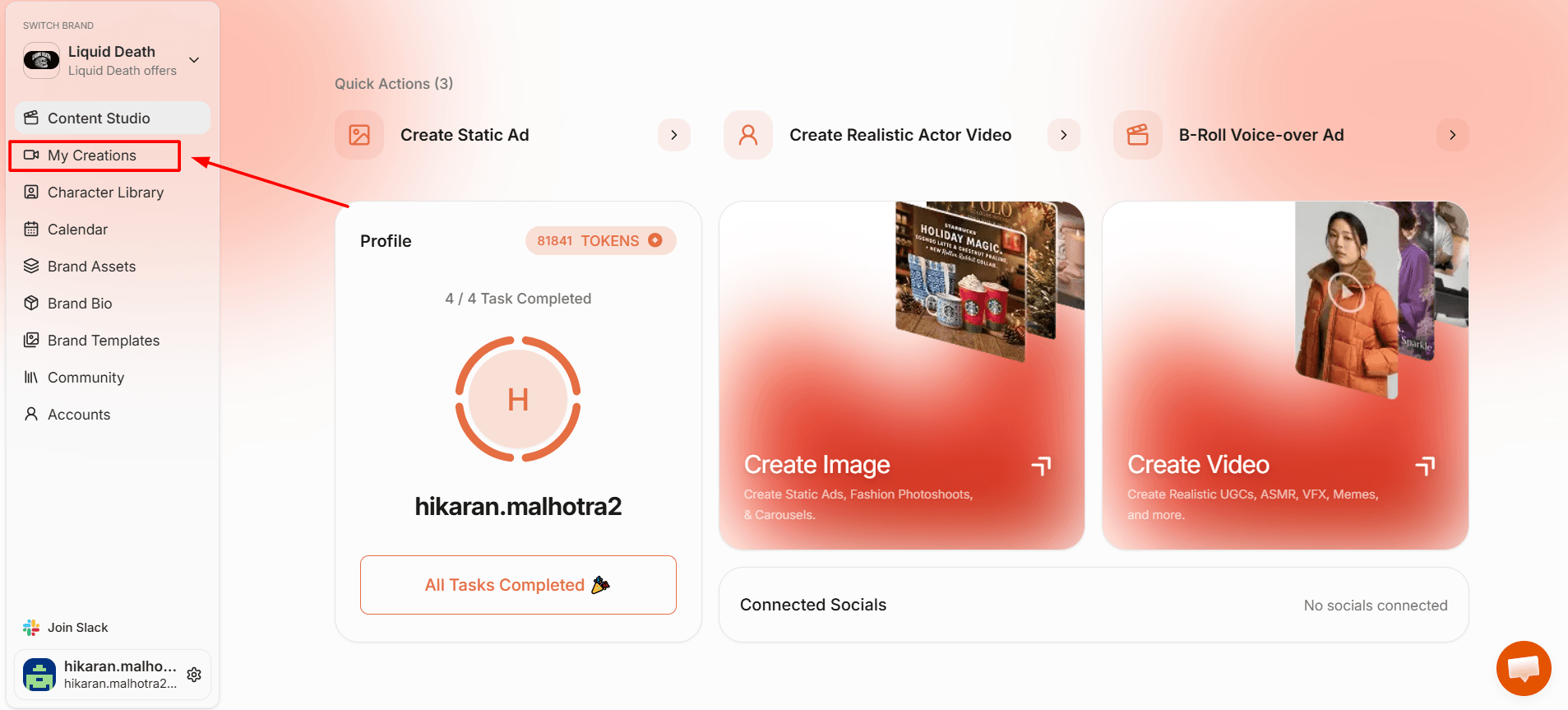
3. Static ad, UGC video, carousel, talking avatar, B-roll voiceover ad, or any of the other formats in the library.
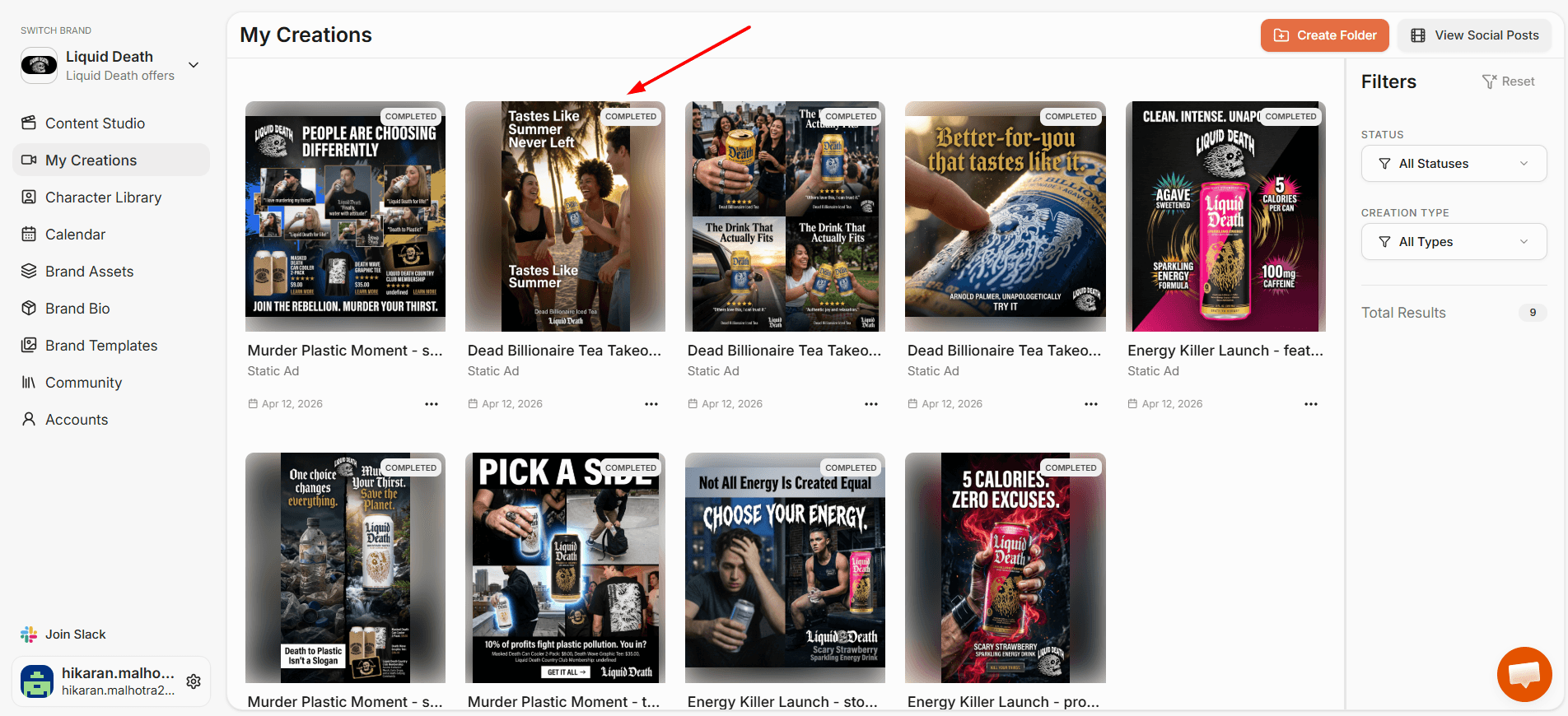
4. Generate captions and visuals in batches. Write or generate scripts, pick your AI actor or visual style, and produce 30 days of content in a few hours.
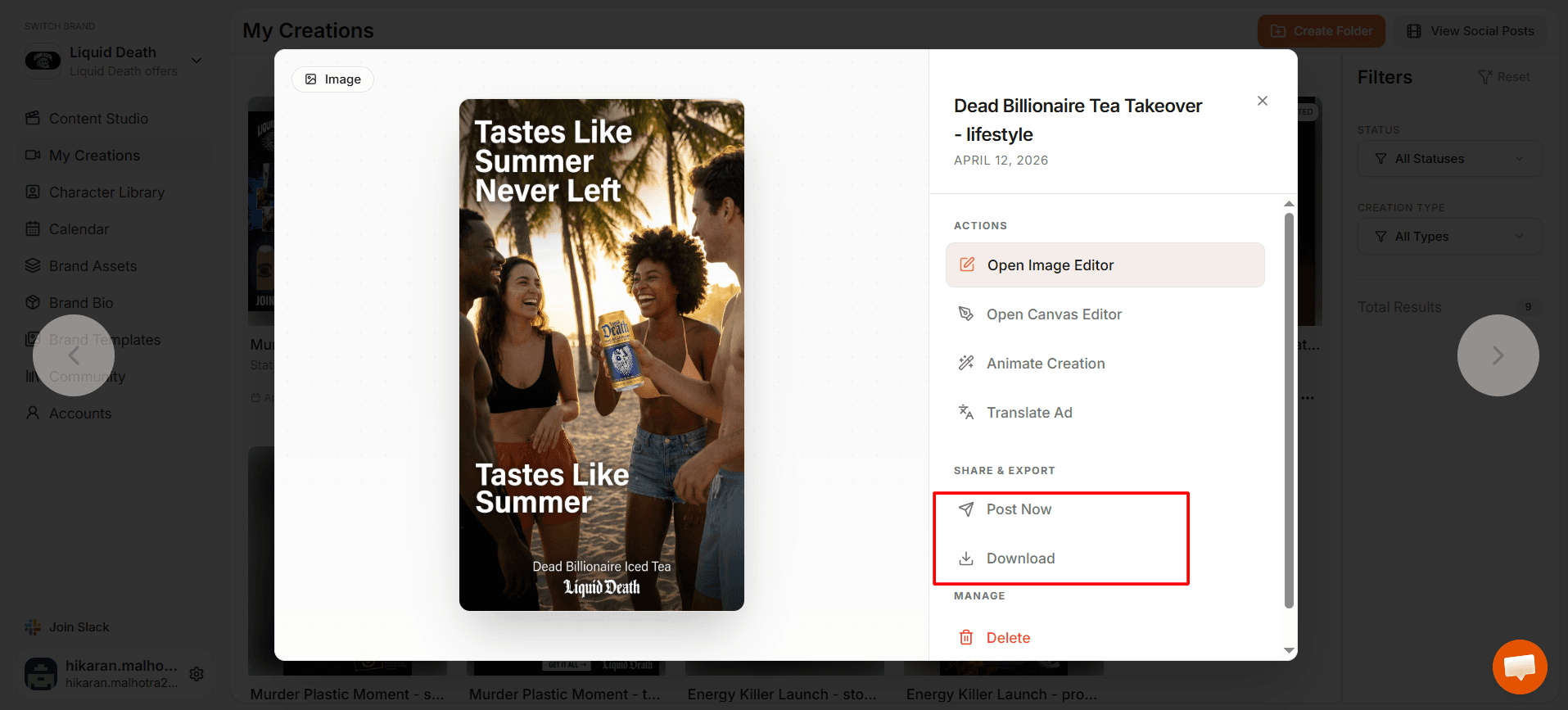
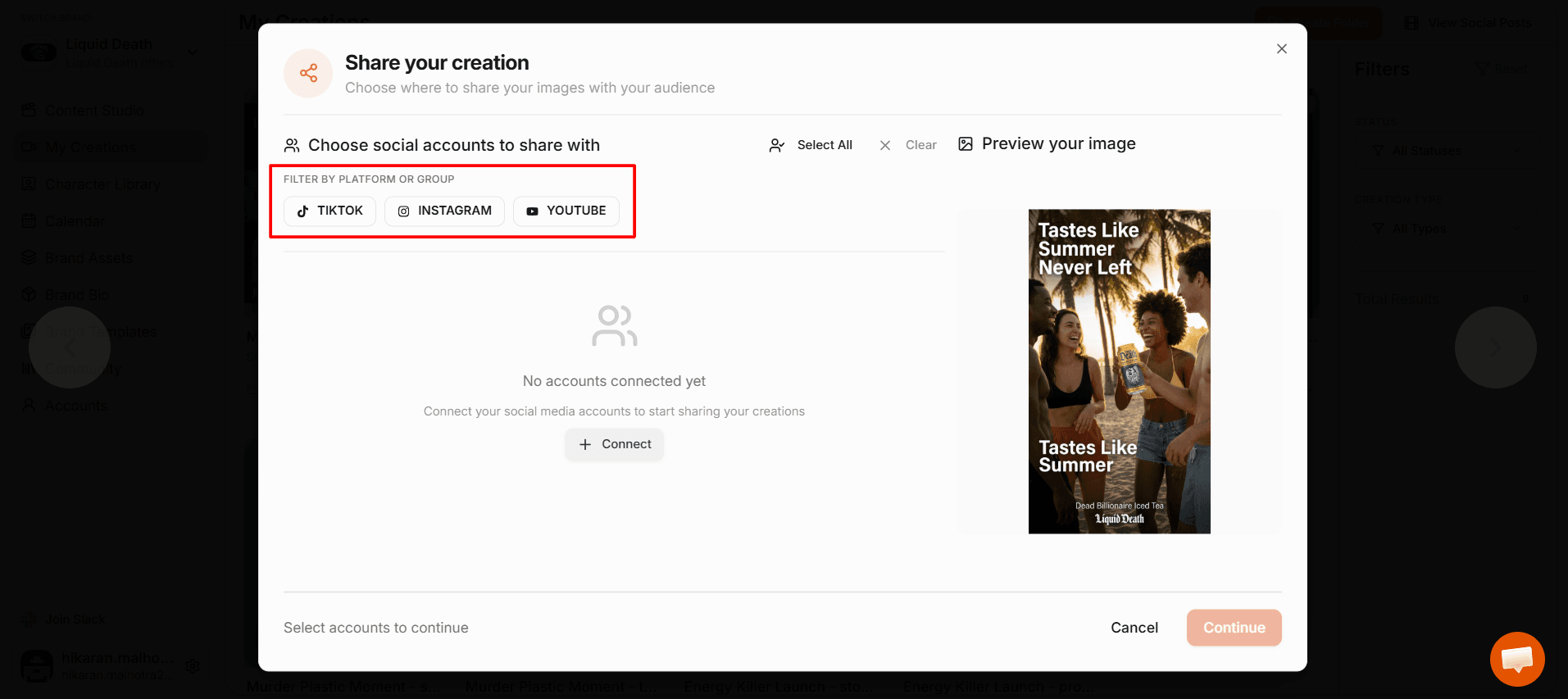
5. Open the content scheduler. Pick the date, time, and platforms for each post.
6. Hit schedule. HeyOz publishes automatically to TikTok, Instagram, YouTube, and Facebook at the times you set.
What you get with HeyOz that other schedulers miss:
One platform that creates the content and posts it. No bouncing between three tools.
AI video, static ads, carousels, UGC, and product visuals generated from a product link, not built from scratch.
A visual calendar view so you see your full month at a glance and move posts around before they go live.
Direct publishing to TikTok, Instagram, YouTube, and Facebook in one action.
Plans start at $44.99 a month, which is less than most brands spend on a single freelance video.
You can start a free trial and run a full month of content through it before you decide.
FAQs
Is there a free AI social media scheduler I can try?
Yes. HeyOz offers a free trial where you can create content and schedule it across TikTok, Instagram, YouTube, and Facebook without paying upfront. You do not need a paid plan to test the workflow end to end.
What is the best AI social media scheduler for small brands?
The best one depends on what you need. If you mostly need scheduling, tools like Buffer or Later handle that well. If you need to create the content too, HeyOz is built for that, since it generates static ads, AI videos, UGC, and carousels alongside the scheduling.
How long does it really take to schedule 30 days of content?
A focused afternoon, around three to four hours, is realistic once your buckets and audience are clear. The first time you do it, expect five to six hours. After that it gets faster because you reuse prompts, templates, and content patterns that worked last month.
Can I edit content after I have scheduled it?
Yes. Inside HeyOz you can adjust any scheduled post before it goes live. You can change the caption, swap the visual, or move it to a different day. The schedule stays flexible right up to the moment of publishing.
About the author
Ahad Shams
Ahad Shams is the Founder of HeyOz, an all-in-one ads and content platform built for founders and small teams. He has worked across consumer goods and technology, with experience spanning Fortune 100 companies such as Reckitt Benckiser and Apple. Ahad is a third-time founder; his previous ventures include a WebXR game engine and Moemate, a consumer AI startup that scaled to over 6 million users. HeyOz was born from firsthand experience scaling consumer products and the need for a unified, execution-focused marketing platform.