

Key Takeaways
- Meta released its official MCP server (Meta Ads AI Connectors) on April 29, 2026 in public beta. Free during the beta. The first time Meta has officially opened its ad infrastructure to third-party AI clients at this integration level.
- No Meta Developer App, no API tokens, no system user setup, no 3-day app review. Authentication is a single OAuth click using the same Meta Business login screen you already use. Setup takes under 5 minutes.
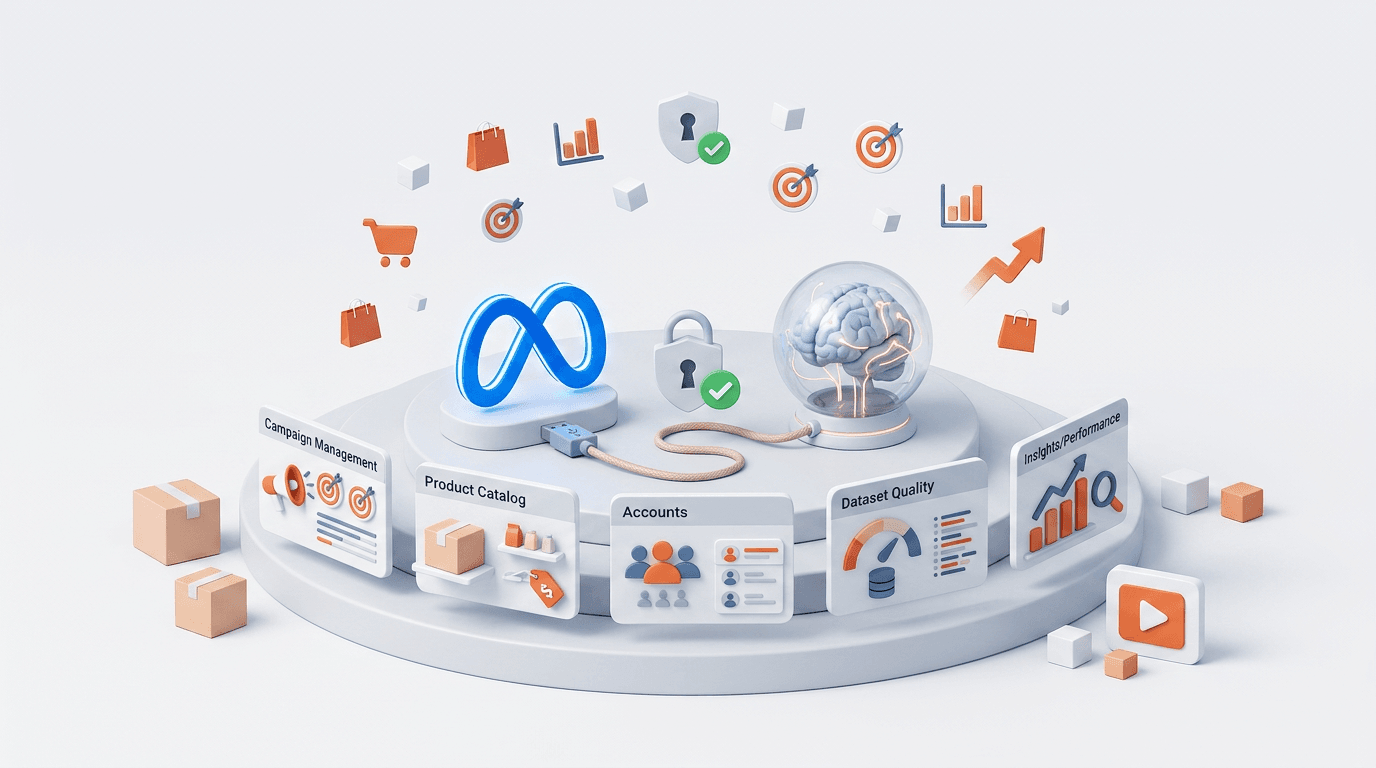
- 29 tools shipping at launch across 5 categories: Campaign Creation & Management (5), Product Catalog (10), Accounts/Pages/Assets (3), Dataset Quality & Diagnostics (4), Insights & Performance (7). Full read AND write access.
- Works with Claude Desktop, Claude.ai, ChatGPT (Plus or higher), Cursor, Codex, and any MCP-compliant client. The official endpoint is mcp.facebook.com/ads.
- Disrupts the third-party MCP market overnight (Pipeboard, Adzviser, Adspirer charge $25-99/month for what Meta now ships free). Third-party MCPs remain valuable for cross-platform reach (Google + Meta + TikTok in one) and specialized workflows like approval gates.
Introduction
The official Meta Ads MCP just dropped. Released April 29, 2026 in public beta. Free during the beta. No Meta Developer App, no 3-day approval wait, no API tokens to manage.
This is the Meta-blessed path. After two years of third-party MCPs charging $25-99/month for the same access, Meta now ships the integration directly. One OAuth click connects Claude (or ChatGPT, Codex, Cursor) to your Meta Ads account with full read and write access to campaigns, ad sets, ads, budgets, audiences, and product catalogs — all in natural language.
This guide gives you the complete setup in under 5 minutes, the 29 tools shipping at launch, the 10 prompts to run on day one, and the full Claude + HeyOz workflow that turns this into a complete Meta ads operating system for $65/month.
What Just Happened?
Meta launched the Meta Ads AI Connectors on April 29, 2026 — its first official MCP server. Until now, every Claude or ChatGPT integration with Meta Ads went through third-party MCPs (Pipeboard, Adspirer, Adzviser, Madgicx, Composio) that wrapped the Marketing API and charged for the convenience.
The official Meta MCP changes the math. Free during beta — no monthly subscription, no per-call fees beyond the existing Marketing API quota. No developer credentials — skip the Meta Developer App, the 3-day app review, the system user setup, and the API token rotation. Native Meta Business OAuth — same login screen you use for Meta Business Suite. 29 tools shipping at launch with full Marketing API coverage including catalogs, insights, diagnostics, and signal quality. Meta-endorsed — the AI automation will ban my ad account risk is officially gone.
If you have been waiting for an official path before automating Meta ad operations with AI, this is it.
What Do You Need to Get Started?
Required:
- A Meta Business Manager account with admin access to the ad accounts you want to manage
- A Marketing API access tier (the standard free tier is sufficient — most accounts already have this)
- An MCP-compatible AI client: Claude Desktop, Claude.ai, ChatGPT (Plus or higher), Cursor, Codex, or any client that supports HTTP MCP
For the full operating system stack:
- Claude Pro ($20/month) — for the AI brain
- HeyOz ($44.99/month) — for ad production
- Meta Ads MCP — free during beta
Total: $65/month for a full Meta ads operating system.
How Do You Set Up the Official Meta Ads MCP?
5 steps, under 5 minutes.
Step 1: Sign in to Meta Business Manager.
Go to business.facebook.com. Confirm you can see the ad account in Business Settings > Accounts > Ad Accounts. Verify your role is Admin (not just Advertiser or Analyst — the MCP needs admin permissions to make changes). If you do not have admin access, ask the account owner to add you. The MCP cannot work around Meta Business Manager permissions.
Step 2: Open your AI client's integrations settings.
Claude Desktop: Settings > Connectors > Add custom connector. Claude.ai (web): profile icon > Settings > Integrations > Add integration. ChatGPT (Plus or higher): profile > Settings > Connectors > Add MCP server. Cursor / Codex / other clients: edit the MCP config file (~/.cursor/mcp.json or similar).
Step 3: Add the official Meta MCP endpoint.
Server URL: https://mcp.facebook.com/ads. Name: Meta Ads (or whatever you want to call it). Transport: HTTP. For config-based clients, the JSON snippet is: {"mcpServers": {"meta-ads": {"type": "http", "url": "https://mcp.facebook.com/ads"}}}. Save the configuration.
Step 4: Authenticate via Meta Business OAuth.
After saving, your client will prompt you to authorize. A browser window opens with the standard Meta Business login screen. Log in with the account that has admin access to your ad accounts. Review the permissions Meta requests: read your ad accounts and campaign data, manage your ads (create, update, pause, activate), access your product catalogs, read your dataset and Conversions API quality. Click Allow. The browser redirects back to your AI client with a success message. You are connected. No tokens to copy, no system user to set up, no developer credentials anywhere on your machine.
Step 5: Test the connection.
Open a new chat in your AI client and type: List all my active Meta ad accounts and the campaigns currently running. Within seconds you should see your accounts and campaigns listed. If you see them, the MCP is working. If not, double-check that your authentication completed, the account you signed in with has admin access, and the Marketing API access tier is enabled on your business account.
What Are the 29 Tools Shipping at Launch?
29 tools organized into 5 categories.
Campaign Creation & Management (5 tools):
ads_create_campaign creates campaigns with objectives, budgets, and special ad categories. ads_create_ad_set builds ad sets with targeting, placements, and optimization goals. ads_create_ad builds individual ads and connects creative assets. ads_update_entity modifies any existing campaign, ad set, or ad (budgets, status, targeting). ads_activate_entity activates or reactivates paused entities.
Product Catalog for Commerce (10 tools):
ads_catalog_create establishes new product catalogs. ads_catalog_get_catalogs retrieves all accessible catalogs. ads_catalog_get_details gets a single catalog's information. ads_catalog_get_diagnostics identifies catalog errors and warnings. ads_catalog_get_feed_rules shows automatic feed configuration rules. ads_catalog_get_product_details displays individual product data. ads_catalog_get_product_feed_details reports feed status and recent imports. ads_catalog_get_product_set_products lists products inside a set. ads_catalog_get_product_sets enumerates product sets in a catalog. ads_catalog_get_products produces paginated product listings.
Accounts, Pages & Assets (3 tools):
ads_get_ad_accounts shows every ad account you have access to. ads_get_ad_entities lists campaigns, ad sets, and ads with filters. ads_get_pages_for_business displays connected Facebook Pages.
Dataset Quality & Diagnostics (4 tools):
ads_get_dataset_details returns pixel and Conversions API data. ads_get_dataset_quality returns event matching quality scores. ads_get_dataset_stats returns event counts and deduplication stats. ads_get_errors returns recent dataset issues and how to fix them. Critical for iOS 14.5+ tracking quality.
Insights & Performance (7 tools):
ads_insights_advertiser_context returns industry and geographic context for your account. ads_insights_anomaly_signal returns KPI deviations from baseline. ads_insights_auction_ranking_benchmarks compares your CTR, CPM, and quality versus your competition. ads_insights_industry_benchmark returns sector-wide performance comparison. ads_insights_performance_trend returns historical metric patterns. ads_get_opportunity_score returns Meta's account-level opportunity assessment. ads_get_help_article pulls relevant Help Center resources contextually.
What Are the 10 Day-One Prompts?
Copy-paste ready. Run each in a fresh chat in Claude (or ChatGPT) once your MCP is connected.
Prompt 1 — Account Health Check:
Check the health of my Meta ad account. For each active ad account I have access to, report total spend in the last 7 days, overall ROAS and CPA, any campaigns paused due to delivery issues, any ad accounts approaching spend limits, and any policy violations or rejected ads in the last 7 days. End with a one-line health rating: Healthy, Watch, or Alert.
Prompt 2 — Yesterday's Performance Snapshot:
Pull yesterday's performance for all active campaigns. Show me spend, conversions, ROAS, CPA, CTR, CPM per campaign. Top 5 campaigns by ROAS. Bottom 5 campaigns by ROAS. Any metric that moved more than 20% versus the 7-day average. Format as a 1-page executive summary.
Prompt 3 — Creative Fatigue Scan:
Scan all my active ads for creative fatigue. Flag any ad with frequency above 3.0, CTR declined more than 15% versus 7-day average, CPC increased more than 20%, or running 21+ days with declining performance. For each flagged ad, recommend pause, refresh creative, narrow audience, or reduce budget. Sort by daily spend at risk.
Prompt 4 — Out-of-Stock Cross-Reference:
Check my product catalog for any products marked out of stock. Then check my active ad sets for any that are driving traffic to those out-of-stock products. List every conflict — ad set name, OOS product, current daily budget, estimated wasted spend per day. Recommend immediate action for each.
Prompt 5 — Catalog Quality Audit:
Audit my product catalog quality. Run diagnostics on the catalog and report any feed errors or warnings, products with missing required fields (image, price, description), products that have not synced in the last 24 hours, and any product set with zero products matching its rules. Rank issues by impact on ad delivery.
Prompt 6 — Conversions API Quality Check:
Check my Conversions API and pixel health. Show me event match quality score per event (Purchase, AddToCart, Lead), recent dataset errors, any events with low match rates that need to be improved, and recommendations for fixing each issue. This is critical for iOS 14.5+ tracking quality.
Prompt 7 — Industry Benchmark Comparison:
Compare my account's performance to industry benchmarks. Show me my CTR, CPM, and CPA versus industry medians for my vertical. Where my account ranks (top 25%, median, bottom 25%). The 3 metrics where I have the biggest gap to close. Specific recommendations for improving the worst-performing metric.
Prompt 8 — Anomaly Detection:
Detect any performance anomalies in the last 24 hours. Look for sudden spend spikes or drops, sudden CPM increases (auction pressure or audience saturation), conversion rate drops without a corresponding CTR change, and audience overlap issues between active ad sets. For each anomaly, diagnose the likely cause and recommend an action.
Prompt 9 — Budget Pacing Audit:
Audit my budget pacing across all active campaigns. For each campaign show current daily spend versus daily budget cap, pace (under-pacing, on-pace, over-pacing), and whether it is on track to hit the monthly target. Recommend reallocations: which campaigns to scale up (if on-pace and ROAS is above target) and which to scale back (if over-pacing with poor ROAS).
Prompt 10 — Opportunity Score Review:
Pull my account's opportunity score from Meta. For each opportunity Meta has flagged, show what it is recommending, the expected impact if implemented, and whether I should action it (yes/no/needs-review) and why. Prioritize by expected ROAS impact.
What Workflow Does This Unlock With Claude and HeyOz?
The Meta MCP gives Claude direct read/write access to your account. Pair that with HeyOz for production and you have a full Meta ads operating system.
The daily loop:
Morning (Claude): Run prompts 1-3. You wake up to a brief that tells you the health of the account, what moved overnight, and which creatives are dying. Mid-day (Claude + HeyOz): Use the angle-mining workflow to surface 30+ angles from reviews and competitor ads. HeyOz produces the finished creatives. Now Claude can also read your account performance directly to inform which angles to test next. End of day (Claude): Run prompts 4, 6, 9. Catch any OOS conflicts, verify pixel health, and check budget pacing before the next day's spend.
The weekly cycle:
Monday Strategic Review: Run prompts 7, 8, 10. Tuesday Pattern Mining: Pull last week's top performers via the MCP, feed them into Claude's winning pattern decoder, get the template for next week. Wednesday Production: Take the top angles to HeyOz, generate 10-20 new ads, export and upload (or have Claude create the campaigns directly via the MCP). Thursday-Sunday Test and Iterate: New batch runs, Friday afternoon run a creative fatigue scan and prepare the next round.
Direct campaign creation (new capability):
Until now, third-party MCPs offered limited or pause-by-default creation. The official Meta MCP includes full ads_create_campaign, ads_create_ad_set, and ads_create_ad tools. You can prompt Claude: Create a new campaign with objective Conversions, daily budget $100, targeting US women 25-44 interested in skincare. Add an ad set with the campaign's objective and a single ad pointing to my product page using my latest product image. Create everything in PAUSED status so I can review before launch. Claude builds it. You review in Ads Manager. Activate when ready.
How Does This Compare to Third-Party MCPs?
The third-party MCP market just got disrupted. Pipeboard, Adzviser, Coupler — all charging $25-99/month for what Meta now ships free.
Official Meta MCP: free, Meta Business OAuth, Meta only, default choice for Meta-only operations. Pipeboard: $49/month, Meta only, advanced workflows like alerts, dashboards, approval gates, and pause-by-default safety. Composio: freemium, multi-platform (Google + Meta + TikTok), best for cross-channel reporting and creative ops. Adzviser: free tier of 15 calls/month or paid, Meta + Google + 28 other platforms, best for read-only multi-platform analytics. GoMarble: free open-source, Meta only, maximum autonomy and custom workflows. Adspirer: free tier or paid, Meta + Google + LinkedIn + TikTok, cross-platform with safety defaults.
Recommendation: start with the official Meta MCP. Add a third-party only if you need a specific capability the official one does not cover (cross-platform, advanced approval gates, or specialized dashboards). For most marketers, the official MCP is sufficient by itself.
What Are the Rate Limits?
The official Meta MCP runs on top of the existing Meta Marketing API rate limits. Two tiers: Development Access (default) — 60 score max per user per app per hour, 300-second decay. Standard Access (apply for upgrade) — 9,000 score max per hour. Read calls cost 1 point. Write calls cost 3 points.
For most solo operators or small teams, Development Access is enough. For agencies running many accounts or high-volume automated workflows, apply for Standard Access through Meta Business Suite > Apps and Permissions > Marketing API access. If you hit a rate limit, the MCP returns an error and you wait out the decay window. Claude will report this clearly in your chat.
What Happens After the Beta?
Meta has not announced post-beta pricing yet. Three likely outcomes: stays free (Meta has incentive to make AI integration as accessible as possible to capture ad spend that might otherwise go to TikTok or Google), moves to a freemium model (basic tier free, premium features like higher rate limits and advanced tools paid), or tied to Marketing API access tier (fee-free for Standard Access holders, premium for higher-volume needs).
Even in the most expensive scenario, Meta's official MCP will likely undercut third-party pricing by a wide margin. The third-party MCPs' value is now in their cross-platform reach and specialized features, not basic Meta access.
Frequently Asked Questions
Is the official Meta MCP really free?
Yes, free during the public beta. You still need a Marketing API access tier (the free Development Access tier works for most users), but there is no MCP-specific subscription fee.
Will using this get my ad account banned?
No. This is Meta's officially endorsed integration. Unlike browser-extension scrapers or unofficial automation tools, the MCP uses Meta's standard OAuth and Marketing API — exactly the same path verified Meta Business Partners use. The AI will ban my account risk is officially over for this approach.
Do I need to be a developer?
No. The setup is OAuth-only — the same flow as connecting any Meta-integrated app like Hootsuite, Buffer, or Shopify. No code, no API tokens, no developer credentials.
Does it work with ChatGPT, Cursor, and Codex too?
Yes. The MCP is HTTP-based and works with any MCP-compliant client — Claude Desktop, Claude.ai, ChatGPT (Plus or higher), Cursor, Codex, and others. Same endpoint, same OAuth flow.
Can I create campaigns directly through the MCP?
Yes. The ads_create_campaign, ads_create_ad_set, and ads_create_ad tools support full campaign creation. Best practice: have Claude create everything in PAUSED status, review in Ads Manager, then activate manually.
Should I cancel my Pipeboard / Adspirer / Adzviser subscription?
Depends on what you use them for. If you use them only for basic Meta Ads access, the official MCP replaces them at no cost. If you use them for cross-platform workflows (Google + Meta + TikTok in one MCP), advanced approval gates, or specialized dashboards, those features still justify the subscription.
Does the MCP support multiple ad accounts?
Yes. Once authenticated, the MCP can read and manage every ad account your Meta Business Manager user has access to. You can specify which account in your prompts.
Can I use this for client accounts as an agency?
Yes, if you have admin access to the client's Business Manager. The MCP respects standard Meta Business Manager permissions — it cannot do anything you could not do logged in to Meta Business Suite directly.
How is this different from Meta's Advantage+ AI?
Advantage+ is Meta's automated optimization within their own platform — you set objectives, Meta optimizes delivery. The MCP is the opposite: it gives external AI agents (Claude, ChatGPT) direct access to your account so they can read data, analyze it, and take actions on your behalf based on your instructions. They are complementary, not competitive.
What about audience creation and management?
The launch tool set focuses on campaigns, ads, catalogs, datasets, and insights. Custom audience creation is partially supported via the entity tools but is not a primary focus of the v1 release. Expect Meta to expand this in coming updates.
About the author
Ahad Shams
Ahad Shams is the Founder of HeyOz, an all-in-one ads and content platform built for founders and small teams. He has worked across consumer goods and technology, with experience spanning Fortune 100 companies such as Reckitt Benckiser and Apple. Ahad is a third-time founder; his previous ventures include a WebXR game engine and Moemate, a consumer AI startup that scaled to over 6 million users. HeyOz was born from firsthand experience scaling consumer products and the need for a unified, execution-focused marketing platform.