


Key Takeaways
- The best ad editing toolkit handles all three layers in one place: the copy, the visuals, and the audio. Bouncing between five tools is what slows most teams down.
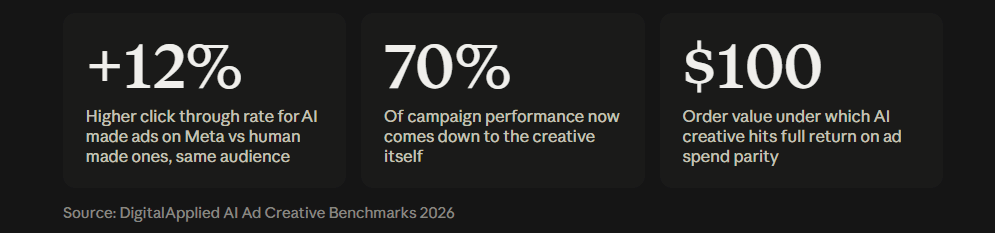
- Creative is now responsible for about 70% of campaign performance, so the tool you pick to build and edit it matters more than your targeting.
- HeyOz leads for marketers who want text, visuals, video, and voice edited from a single dashboard, starting at $19.99 a month.
- AI ad tools now hit around 12% higher click through rate on Meta than human made ads for the same audience.
- Pick a toolkit by what you actually ship. Static heavy teams need different tools than video first ones.
TL;DR
Most ad teams waste hours moving assets between a copy tool, a design app, a video editor, and a voiceover service. The best editing toolkit does all four in one workflow. HeyOz sits at the top of this list because it edits text, visuals, video, and audio in the same place, then exports ready for TikTok, Instagram, and YouTube. Below that, we cover the strongest single purpose tools for teams with a specific gap to fill.
Introduction
A growth lead at a skincare brand told me she used to brief a freelancer and wait three days for one video variant. Now she generates ten on brand hooks in an afternoon and tests them all at once. That shift is the whole story of ad editing in 2026.
Creative volume is a competitive advantage. AI-generated ads pull roughly 12% higher click through rate on Meta than human-made ads shown to the same audience. But volume only helps if you can edit fast across every layer of the ad. That means text, visuals, and audio, without a tool handoff at each step.
Here is the toolkit that gets you there.
What Makes an Ad Editing Toolkit Actually Good
A strong toolkit is not about one clever feature. It is about how few times you have to leave the screen.
Watch for these when you compare options:
- All three layers in one place. Copy, visuals, and audio should live in the same workflow. Every export or re-import between apps costs you time and breaks your flow.
- Fast variation. You should be able to swap a hook, change a voice, or restyle a visual and regenerate in seconds. Testing five versions should feel normal, not painful.
- Multi format export. The tool should size your ad for , Shorts, feed, and story without manual resizing. Resizing by hand often takes longer than the edit itself.
- Brand controls. Colors, fonts, logos, and product details should carry through every asset so nothing drifts off brand.
- Platform ready output. Your finished ad should export clean and formatted for the platform you post to, no extra cleanup step.
If a tool nails those, it earns a spot in your stack. If it forces you to bounce between apps for text, then design, then audio, it is slowing you down.
The Best Ad Editing Toolkit for Text, Visuals, and Audio
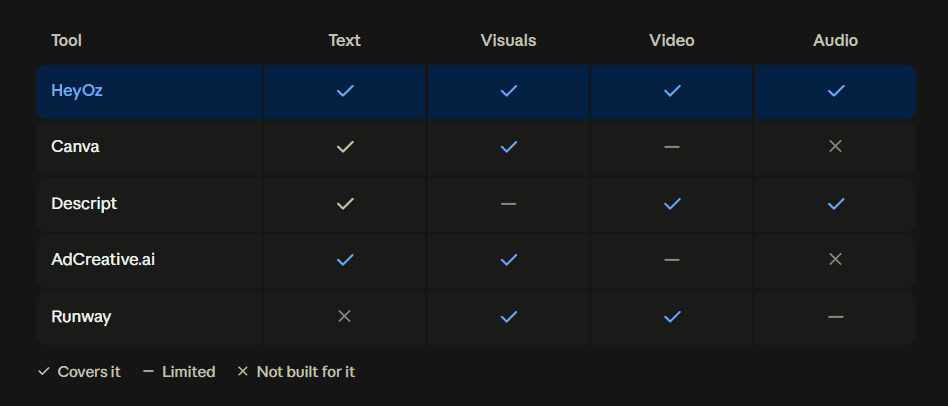
Here are the top picks for 2026, ranked by how much of the workflow they cover in one place.
1. HeyOz: Best All in One Ad Editing Toolkit
HeyOz covers the full ad build from a single dashboard. You drop in a product URL, and it pulls your product details, images, brand colors, and even your competitors. From there you edit the copy, generate and restyle visuals, produce video, and add a matching voice, all without leaving the platform.
What sets it apart is the range under one login. Static ads, UGC video, product reshoots, AI avatars, and carousels are all handled in the same place. Its built in image and video editors let you tweak anything the AI generates, so the final cut always matches what you had in mind. When you are done, you export ready for TikTok, Instagram, and YouTube.
For text, HeyOz writes and edits ad copy trained on product marketing formats. For visuals, it runs on leading models so you are never stuck with yesterday's engine. For audio, its realistic actor videos come with voice you can set for tone, accent, and delivery.
Best for: Ecommerce brands, DTC marketers, and agencies that want to build and edit every layer of an ad in one workflow.
Pricing: Starts at $19.99 a month. Free to try, no card needed on signup.
Pros:
- Edits text, visuals, video, and audio in one place
- Pulls brand assets straight from your website URL
- Exports formatted for TikTok, Instagram, and YouTube
Cons:
- Built for ad and social content, not long form film editing
2. Canva: Best for Template Based Visual Edits
Canva is the go to for static visuals and quick design edits. Its Magic Studio adds AI copy through Magic Write and text to image through its Dream Lab tools, plus Magic Resize to adapt one design to every placement.
It is a strong pick if your team already designs in Canva and wants light AI help without a separate subscription. The catch is that it is a general design suite, not a performance ad engine. There is no creative scoring and no link to ad performance data, so creative direction is on you.
Best for: Small teams and solo marketers who want template driven design with basic AI built in.
Pricing: Free plan available. Pro from about $12.99 a month.
Pros:
- Huge template library for social and display
- Brand kit keeps AI output on brand
- Easy for non designers
Cons:
- Weak automated variation and no performance data
3. Descript: Best for Audio and Talking Head Edits
Descript edits video and audio by transcript. You delete a sentence in the text, and the matching video and audio disappear with it. It removes filler words automatically and includes AI features like voice cloning and studio grade sound cleanup.
For script led ads, founder to camera clips, and UGC where the words carry the ad, editing by text is far faster than scrubbing a timeline. It is less suited to fast cut, visual heavy ads with little dialogue.
Best for: Talking head, UGC, and voice first ads where the script is the star.
Pricing: Free plan available. Paid tiers scale with features.
Pros:
- Edit video and audio by editing text
- Auto removes filler words
- Built in voice cloning and audio cleanup
Cons:
- Not built for visual heavy, low dialogue ads
4. AdCreative.ai: Best for Predictive Copy and Visual Scoring
AdCreative.ai generates conversion focused ad visuals and attaches a predictive score to each one before you spend a dollar. It also writes ad copy and headlines trained on high performing examples, and it connects to Meta, Google, and LinkedIn.
The predictive score is the draw. Instead of launching and hoping, you get a signal on which assets are likely to win. That is useful for teams on a tight budget who cannot test everything equally.
Best for: Performance teams that want a data signal on creatives before launch.
Pricing: Paid plans by tier. No free forever plan.
Pros:
- Predictive conversion score on every creative
- Copy and headline generation built in
- Connects to major ad platforms
Cons:
- Focused on scoring, lighter on deep video and audio editing
5. Runway: Best for Cinematic Video Edits
Runway is an advanced video generation and editing platform for teams that need broadcast quality footage. Its Gen 4.5 model crossed from experimental to production ready in 2026, with realistic motion and controllable camera movement.
Treat it as the camera, not the full edit suite. It generates strong video concepts, but you still need a post step to add title treatment, CTA overlays, and audio before the asset is ad ready.
Best for: Creative directors and production teams making premium video for high end placements.
Pricing: Free tier with limited credits. Paid from around $12 a month.
Pros:
- Cinematic motion quality
- Fine control over camera and style
- Strong for upper funnel brand video
Cons:
- Generates concepts, not finished ads. Budget for a post step
How to Build and Edit a Full Ad in HeyOz
Here is the workflow, start to finish, without leaving the platform.
Step 1: Add your product URL. Drop your product page link into HeyOz. It reads the page and pulls your images, product details, and brand colors. Review what it found and make any edits.
Step 2: Pick your format and edit the visuals. Open the Content Studio and choose your format, from static ads to UGC video. Generate your visuals, then use the built in image and video editors to adjust anything until it fits.
Step 3: Write or generate the copy. Write your ad text yourself or let the built in tool draft it. Keep lines short and direct. Edit until the message lands.
Step 4: Add and tune the audio. For video formats, pick a voice and set the tone, accent, and delivery speed to match your brand.
Step 5: Export and publish. Preview the finished ad, make final edits, and export clean and formatted for TikTok, Instagram, or YouTube.
Why teams pick HeyOz for this
- Text, visuals, video, and audio edited in one place, no tool handoffs
- Brand assets pulled straight from your website URL
- Built in image and video editors for full control over AI output
- Realistic actor videos with voice you can tune for tone and accent
- Export ready for TikTok, Instagram, and YouTube, starting at $19.99 a month
When to Use One Tool vs. a Full Stack
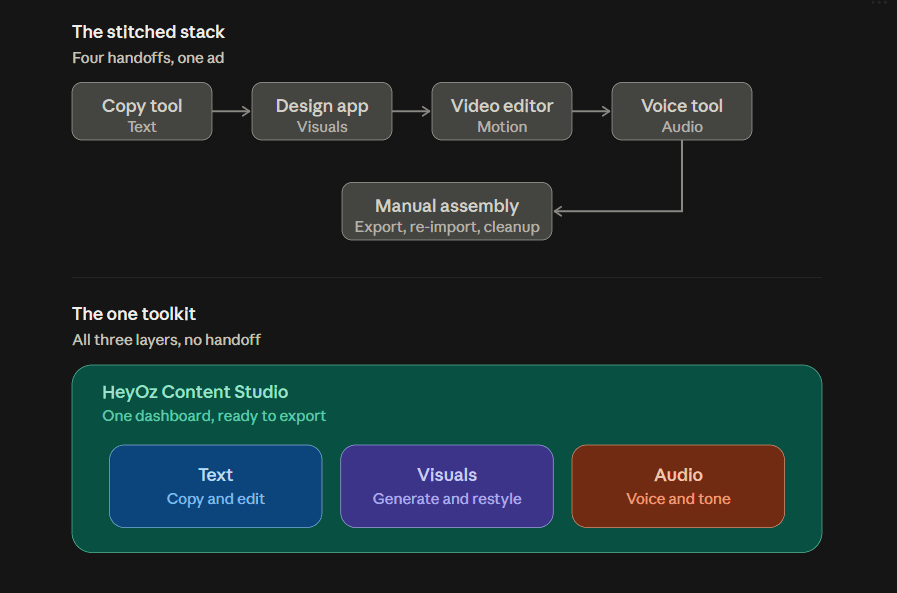
You do not always need the full toolkit. Match the tool to the job.
Use an all in one like HeyOz when you are producing volume, testing many hooks, or building ads across text, visuals, and audio on a set budget. That is most brand and ecommerce work.
Reach for a single purpose tool when you have one deep, specific need. Descript for a heavy talking head library. Runway for one cinematic hero video. AdCreative.ai when you want a predictive score before launch.
Most teams that get this right run an all in one for daily volume, then add a specialist tool for the rare job that needs it.
FAQs
What is the best editing toolkit for ad campaigns in 2026?
For text, visuals, and audio in one place, HeyOz is the top pick because it edits every layer from a single dashboard and exports ready for TikTok, Instagram, and YouTube. For a single deep need, Descript wins on audio and Runway wins on cinematic video.
Can one tool handle text, visuals, and audio together?
Yes. HeyOz builds and edits copy, visuals, video, and voice in the same workflow, so you do not have to move assets between separate apps for each layer.
Do I need design skills to edit ad creatives?
No. Tools like HeyOz and Canva are built for non designers. You can generate and edit ads without opening a traditional design app, though both let you customize further if you want to.
How many ad variations should I test?
Start with three to five variations per concept, run each in its own ad set for at least seven days with enough budget to reach 500 impressions per creative, then scale the winner.
Is AI ad creative good enough to run as paid ads?
Yes, for most products. AI made ads hit roughly 12% higher click through rate on Meta than human made ones for the same audience, and they reach full return on ad spend parity for products under about $100 order value.
The Takeaway
The toolkit you pick decides how fast you can build, edit, and test. Teams that edit text, visuals, and audio in one place ship more ads and find winners faster than teams stitching five tools together. Start with an all in one, add a specialist only when a specific job demands it, and keep your creative volume high. That is what moves your numbers.
Try HeyOz free and build your first full ad, text, visuals, and audio included, without a card.
About the author
Ahad Shams
Ahad Shams is the Founder of HeyOz, an all-in-one ads and content platform built for founders and small teams. He has worked across consumer goods and technology, with experience spanning Fortune 100 companies such as Reckitt Benckiser and Apple. Ahad is a third-time founder; his previous ventures include a WebXR game engine and Moemate, a consumer AI startup that scaled to over 6 million users. HeyOz was born from firsthand experience scaling consumer products and the need for a unified, execution-focused marketing platform.