


Key Takeaways
- Kling 3 was built by Kuaishou, the team behind one of the largest short-video platforms on earth, and it produces ecommerce footage with realistic motion, accurate lighting, and consistent product detail across every frame.
- Product demo videos have an average conversion rate of 34%, nearly double what written product descriptions deliver, according to SQ Magazine's 2025 video marketing report.
- A Kling 3 product video works best when you upload your actual product image as a visual reference and write a scene description with clear camera direction.
- Inside HeyOz, Kling 3 generates clean, watermark-free videos in minutes, and the platform handles editing and direct publishing to TikTok, Instagram, and YouTube.
- HeyOz starts at $44.99 a month and gives you access to Kling 3 alongside Veo 3.1, Sora 2, and Seedance 1 under a single subscription.
Introduction
64% of consumers say they are more likely to buy a product after watching a video of it, according to SellersCommerce. The catch is most ecommerce brands cannot afford to film fresh footage every week. Kling 3 closes that gap, and using it inside HeyOz is the fastest way to put it to work.
Why Kling 3 Stands Out for Ecommerce Product Videos
Most AI video models still struggle with the basics. Subjects drift between frames. Hands look wrong. Lighting flickers in ways that immediately read as generated. For brands trying to sell a product, that is a deal breaker.
Kling 3 was developed by Kuaishou, the same team behind one of the largest short-video platforms in the world. They built it to produce content that performs in real scroll environments, in front of real buyers. The physics are grounded. Fabric moves with weight. Liquids pour the way liquids actually pour. Surfaces catch light the way they would on a real shoot.
For ecommerce brands, that translates into footage you can actually post without worrying that someone will scroll past because something feels off. The product looks like the product. The motion looks intentional. The light makes sense.
That is the bar Kling 3 hits consistently, and that is the reason ecommerce teams testing multiple AI video models keep coming back to it for anything longer than three seconds.
The Types of Ecommerce Product Videos Kling 3 Handles Well
Not every product needs the same kind of video. A skincare serum needs close-up tactile shots. A pair of sneakers needs motion. A supplement bottle needs clean product reveals. Kling 3 handles each of these formats with different strengths worth knowing about.
- Close-up product reveals. Slow pushes onto the product, subtle rotation, light gliding across the label. This is where Kling 3 produces some of its strongest work, because the model handles reflective surfaces and detail rendering with real precision.
- Lifestyle scenes with the product in context. A coffee mug on a kitchen counter with steam rising. A water bottle on a yoga mat with morning light. Kling 3 builds these scenes with believable depth and natural-feeling ambient motion.
- Motion-heavy product demos. Sneakers in mid-stride. A bag swinging in someone's hand. A blender finishing a pour. These are the shots that fall apart in most AI video tools. Kling 3 holds the motion physics together where weaker models break down.
- ASMR and sensory-focused videos. Tracing fingers along a product, lid-lifting, tapping, pouring. Kling 3's frame-to-frame consistency makes this format work because the product stays the product across every frame.
If you want a stat to put behind it: 66% of video marketers say product videos deliver stronger ROI than any other video content type, per Shopify's 2025 video marketing data. The category earns the investment.
How to Write a Kling 3 Prompt That Actually Produces Usable Footage
Prompting is where most brands lose the quality they were promised. A vague prompt produces a vague video. A specific prompt produces a video you can post.
Three things to include in every Kling 3 prompt:
- The subject and its placement. Tell the model what the product is, where it sits in the frame, and what surface it is on.
- The lighting feel. Golden hour, soft window light, studio bounce, neon backlight. The lighting language sets the mood.
- The camera behavior. Slow push in, subtle orbit, locked-off shot with the product rotating. This is the part most prompts skip, and it is the part that separates amateur output from directed output.
A weak prompt might look like
A video of my sneaker.
A strong Kling 3 prompt looks like
A white running sneaker placed on a polished concrete floor, soft morning light from the upper left, slow camera push toward the laces, shallow depth of field. That kind of structured input is closer to a real shot list, and Kling 3 reads it that way.
One more thing worth saying. When you generate a Kling 3 product video inside HeyOz, you can upload your actual product image as the visual anchor. The model uses that image as the foundation for the scene, which means the video shows your product, not a generic approximation. That single step is the difference between a generic AI clip and footage you can run as an ad.
How to Use Kling 3 for Ecommerce Product Videos Inside HeyOz
HeyOz puts Kling 3 directly inside your content workflow. You do not need a separate Kling subscription, a separate login, or a separate export pipeline. Everything runs from one dashboard.
Here is the step-by-step process inside HeyOz:
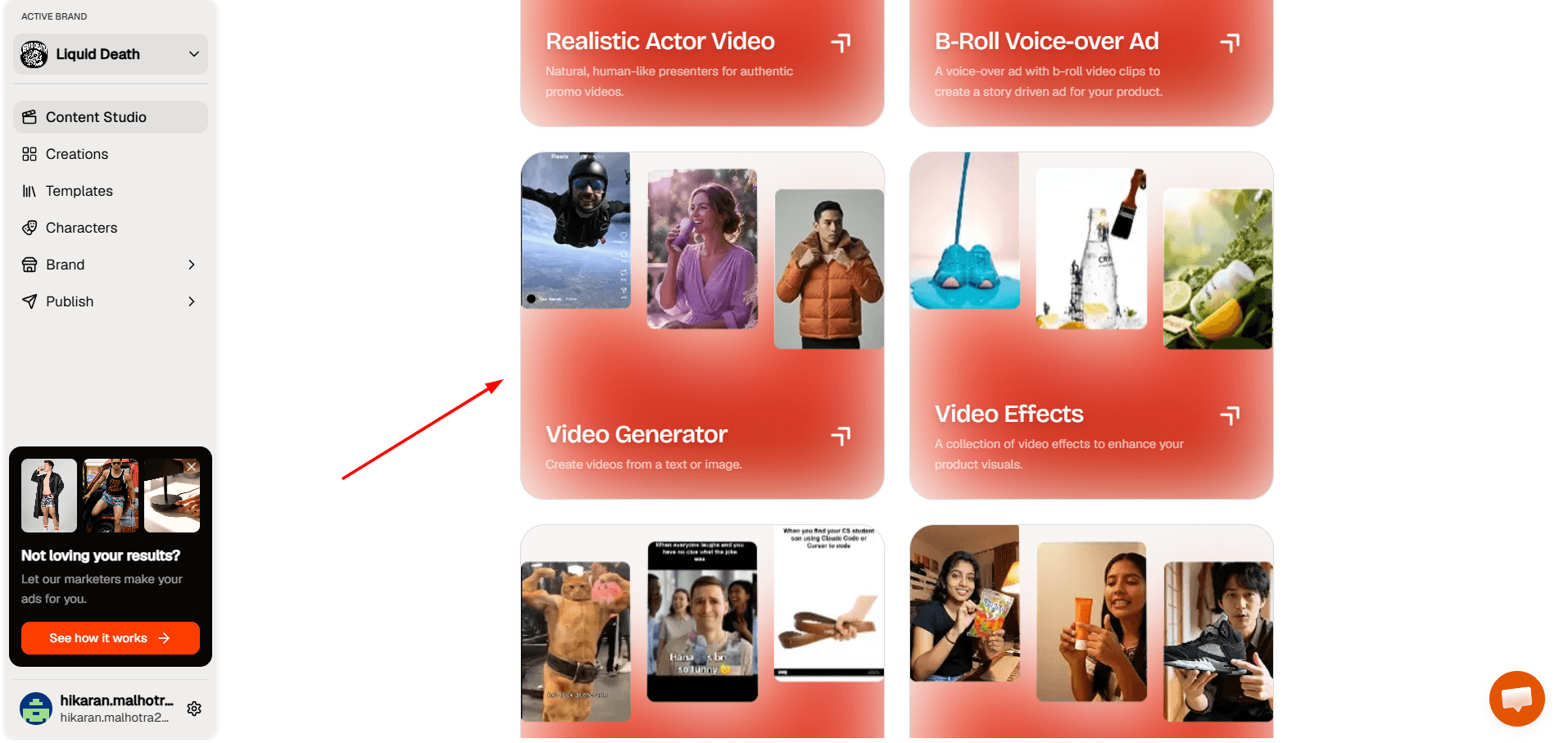
Step 1: Open the Video Generator
In Content Studio, click the Video Generator card to create a video from text or an image.
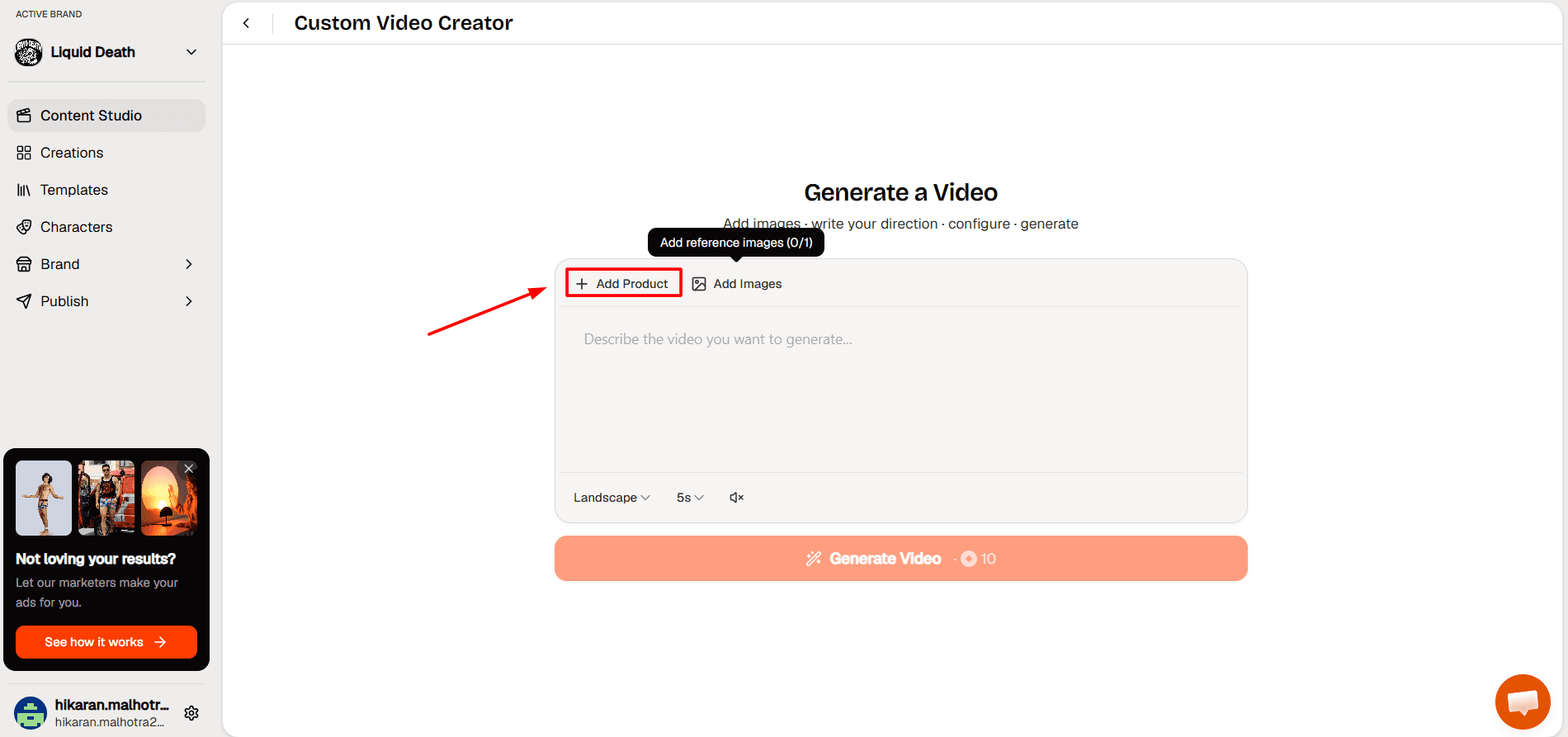
Step 2: Add Your Product
On the Generate a Video screen, click “Add Product” to attach a product to the clip.
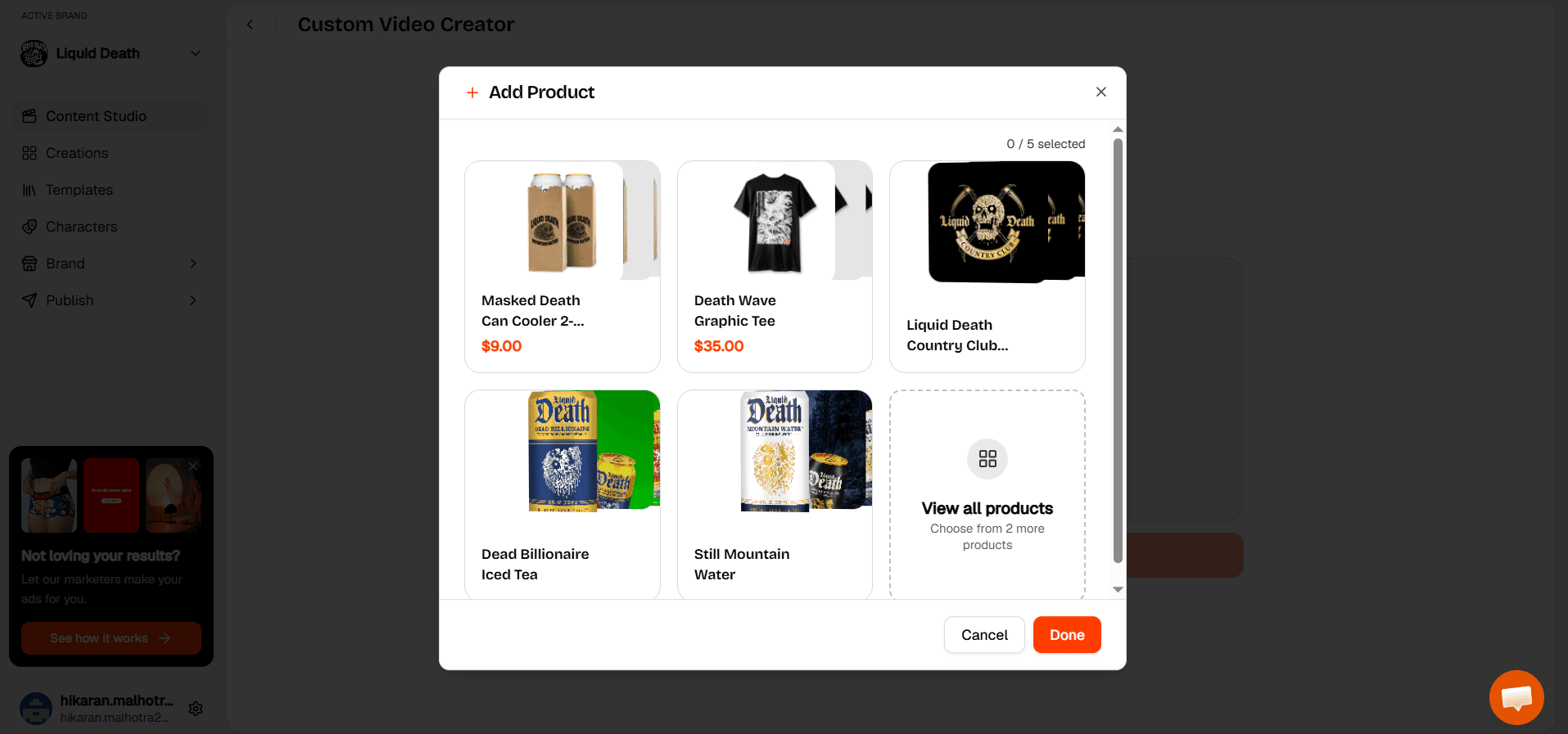
Step 3: Select a Product
Pick a product from the list, or click “View all products” for more, then click “Done.”
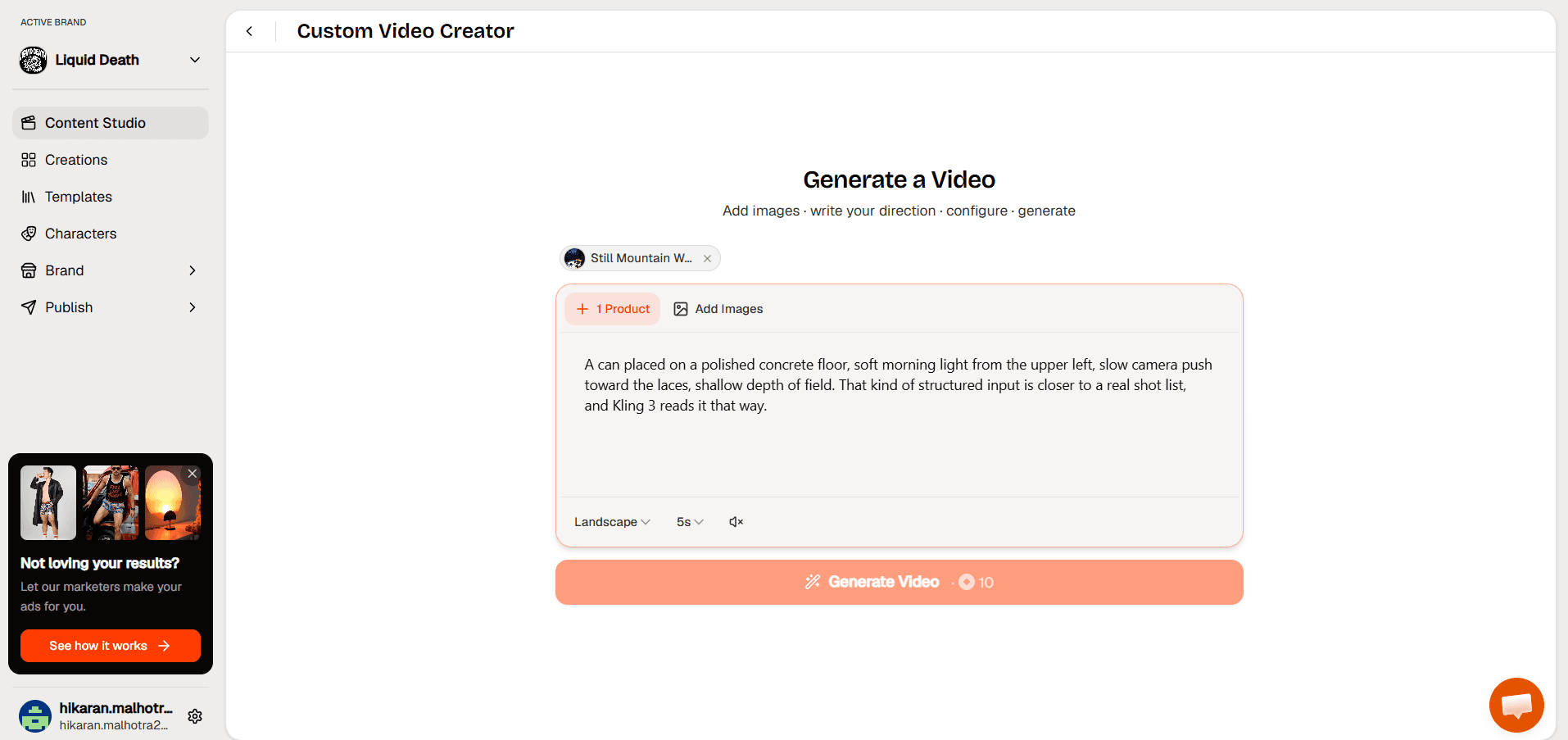
Step 4: Write Your Direction and Set the Format
Describe the scene in detail, then set the orientation, duration, and sound before clicking Generate Video.
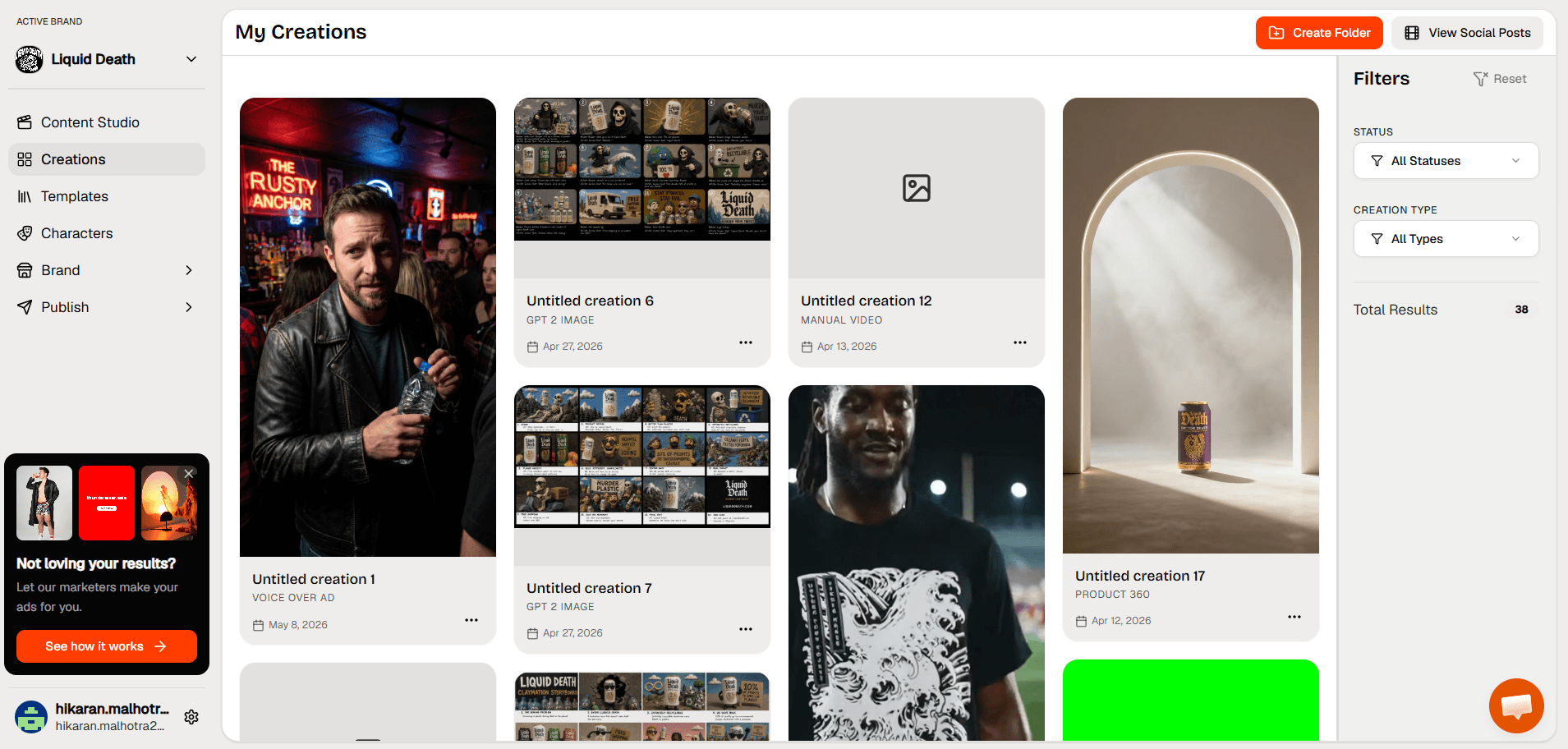
Step 5: Find Your Video in Creations
Once generation finishes, your clip appears in “Creations” where you can review, download, or publish it.
What you get from using Kling 3 inside HeyOz:
- Access to Kling 2 alongside Veo 3.1, Sora 2, and Seedance 1 under one subscription, starting at $44.99 a month.
- Clean exports with no watermark, so what you download is what you post.
- Built-in video editor that lets you trim, add captions, change music, and refine each scene without leaving the platform.
- Direct publishing to TikTok, Instagram, YouTube, and Facebook from the same dashboard you used to generate the video.
- Automatic product page scraping that pulls in your existing images and brand details, so you are not re-entering product information for every new video.
You can read more about the model on the Kling 2 product page at heyoz.com, and start a free trial at HeyOz.com.
The Bigger Picture for Ecommerce Brands
Product video is no longer optional for ecommerce. 78% of people say they would rather learn about a product by watching a short video than by reading text, per SellersCommerce. Brands that can produce that video at volume win. Brands that cannot are watching their conversion rates drop.
Kling 3 makes the production part affordable. HeyOz makes it usable. The combination is what lets a small ecommerce team produce the kind of footage that used to require a studio booking and a three-day shoot, in the time it takes to write a good prompt.
FAQs
Is Kling 3 better than Sora 2 or Veo 3.1 for ecommerce product videos?
Each model has different strengths. Kling 3 handles motion physics and product realism exceptionally well, especially for footage with weight, liquid, or fabric movement. Veo 3.1 is strong on cinematic depth and frame-to-frame consistency. Sora 2 handles wide stylistic range. Inside HeyOz you can test all three on the same product brief without a separate subscription for each.
Can I generate a Kling 3 product video from just a text prompt without an image?
Yes, Kling 3 supports both text-to-video and image-to-video inside HeyOz. For ecommerce specifically, uploading your actual product image as the visual reference produces better results because the video shows your real product instead of a generated approximation of what you described.
How long does it take to generate a Kling 3 product video inside HeyOz?
Most clips finish rendering in a few minutes. The total time depends on your prompt complexity, the video length, and the resolution you select. For most ecommerce use cases, you can go from product image to a finished video ready to post in under ten minutes.
Are Kling 3 videos generated in HeyOz safe to use in paid ads?
Yes. Videos generated through HeyOz export clean with no watermark, no platform branding, and full commercial use rights. Brands run them as paid ads on Meta, TikTok, and YouTube without any extra licensing steps.
About the author
Ahad Shams
Ahad Shams is the Founder of HeyOz, an all-in-one ads and content platform built for founders and small teams. He has worked across consumer goods and technology, with experience spanning Fortune 100 companies such as Reckitt Benckiser and Apple. Ahad is a third-time founder; his previous ventures include a WebXR game engine and Moemate, a consumer AI startup that scaled to over 6 million users. HeyOz was born from firsthand experience scaling consumer products and the need for a unified, execution-focused marketing platform.