

TL;DR
The best realistic AI product photography tools take one photo of your product and put it in a believable scene. HeyOz leads this list because it keeps your real product exact, adds lifestyle and model shots, and turns those photos into static ads in the same app. Photoroom and Claid are strong for catalog cleanup. Google Product Studio is free for Merchant Center sellers.
Key takeaways:
- HeyOz is the top pick for brands that need product photos and finished ads from one tool. Plans start at $19.99 a month.
- Photoroom and Pixa give you the most credits for the money on catalog cleanup.
- Google Product Studio is the best free option if you sell through Google Merchant Center.
- A real looking AI photo passes 4 checks: the product stays exact, the light matches, the shadows land right, and hands look human.
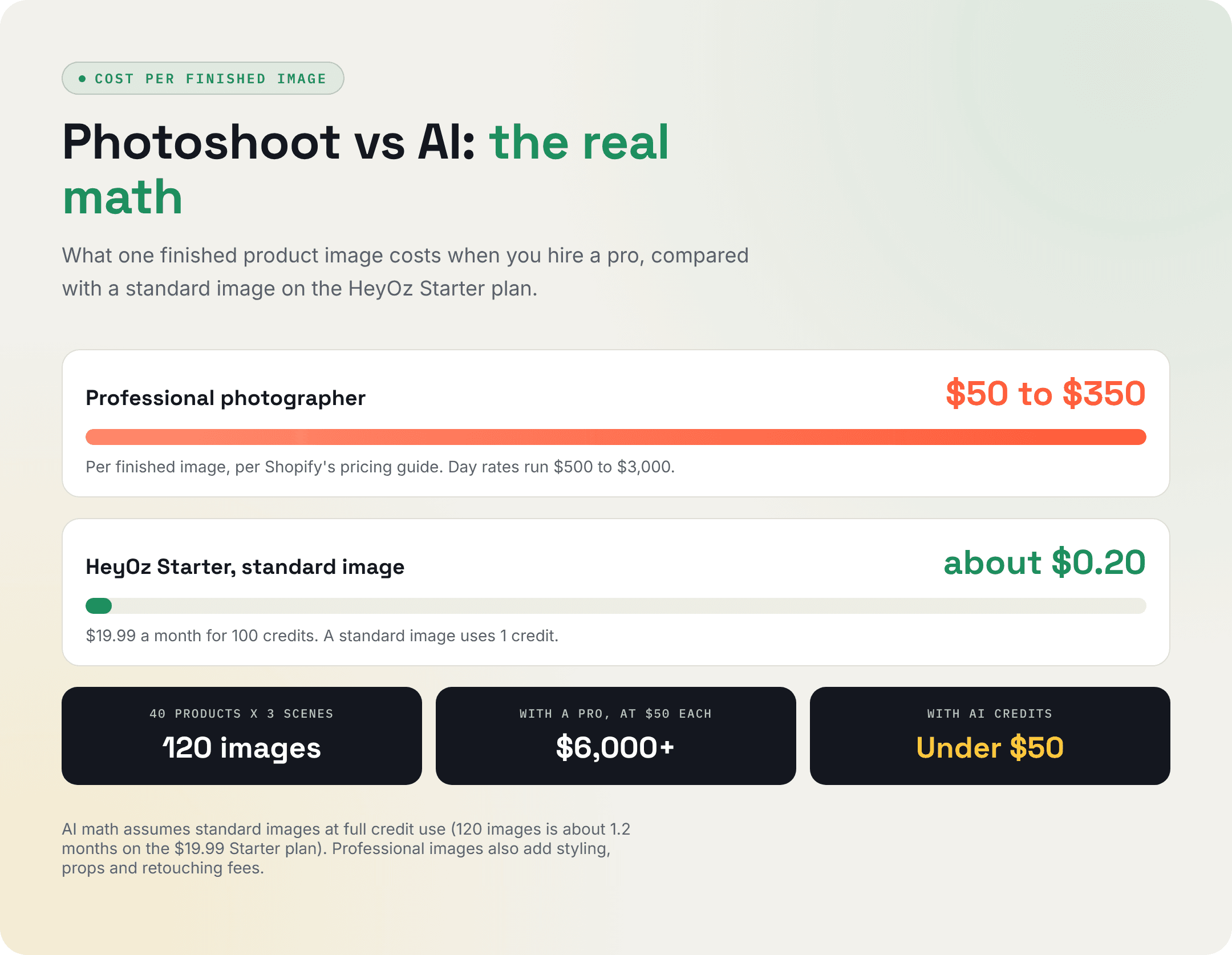
- A pro photographer charges $50 to $350 per finished image. A standard HeyOz image costs about 20 cents.
A pro product photographer charges $50 to $350 for each finished image, according to Shopify . Shoot 40 products in 3 scenes and the bill lands somewhere between $6,000 and $42,000.
AI tools now do that job from one phone photo. We checked prices and plan limits for 8 of the best realistic AI product photography tools in November 2026.
What Makes an AI Product Photo Look Real
Shoppers lean on photos more than anything else on a product page. Salsify's 2026 research found that 61% of shoppers rank images and videos as the most important page element for completing a purchase.
Accuracy matters just as much. In the same research , 45% of shoppers said they returned an online purchase in the past year because of incorrect product content.
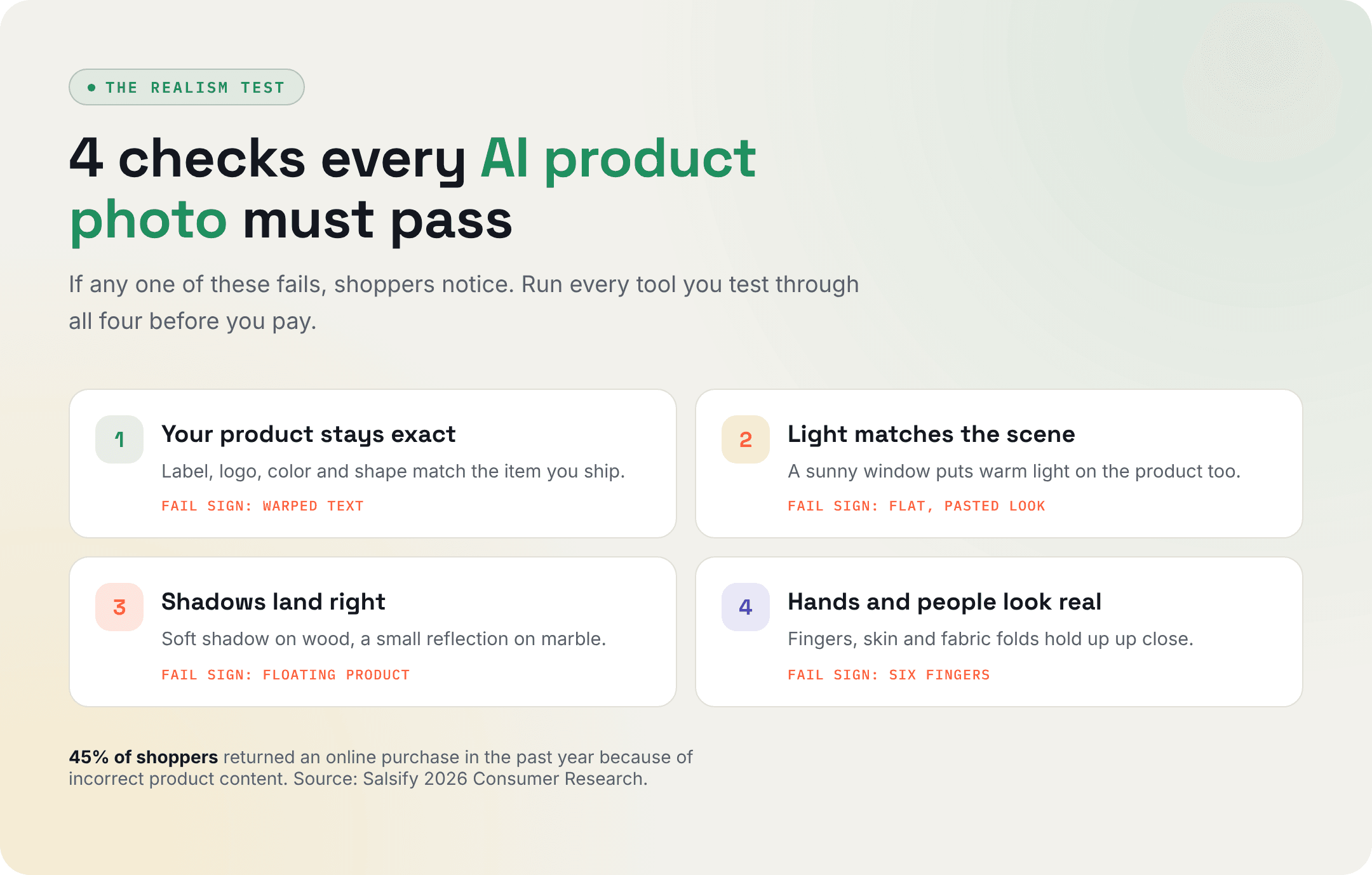
A good AI product photography generator gets 4 things right:
- Your product stays exact. The label, color, shape, and logo match the real item.
- The light matches the scene. A sunny window should put warm light on your product too.
- Shadows and reflections make sense. A mug on wood casts a soft shadow.
- Hands and people look natural. Fingers and fabric folds are where weak tools fail first.
If a tool redraws your product instead of placing it, skip it. A redrawn label is how you end up with a return.
The Best Realistic AI Product Photography Tools in 2026
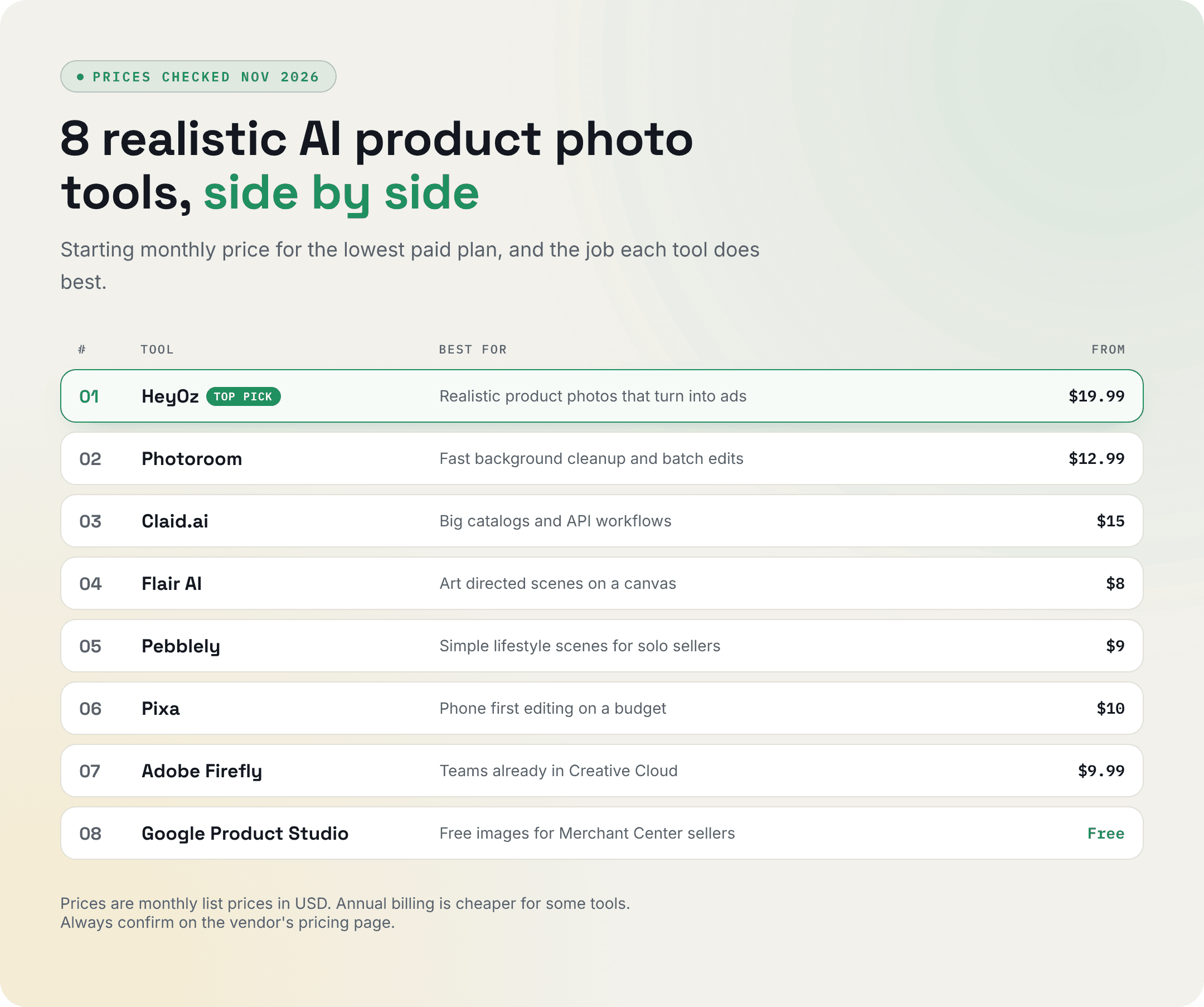
These are the best realistic AI product photography tools right now. Prices were checked in November 2026, and every tool uses the same format so you can compare them fast.
1. HeyOz
Best for: Online brands that want realistic product photos and ads they can run today, from one app.
Pricing: Starter is $19.99 a month for 100 credits. A standard image costs 1 credit, and videos cost 5 to 15 credits. Professional is $99.99 a month, and Enterprise starts at $599. New signups get 3 free ads with no card needed.
What it does well:
- puts one photo on marble, wood, or a cafe table, with matched light and shadows, and keeps your real label and shape.
- Model shots show your product held, worn, or used by a person, with no casting or booking.
- Brand DNA reads your site and keeps every image in your colors.
Watch out for: Credits are shared between images and video. A 15 credit video uses the same budget as 15 standard images.
2. Photoroom
Best for: Sellers who need fast background cleanup and batch edits on a big catalog.
Pricing: Pro is $12.99 a month , or $7.50 a month billed yearly, with 8,000 AI credits and 1,000 exports. Max is $20.99 a month billed yearly. The free plan adds a watermark and is not licensed for commercial use.
What it does well:
- Background removal is fast and clean, even on tricky edges.
- AI Backgrounds and preset AI Shadows restage a product in a few clicks.
- AI Fashion Models put your clothing on a virtual model.
Watch out for: It only edits photos you already have, so you need another tool to build ads.
3. Claid.ai
Best for: Big catalogs and teams that want to plug image editing into their own software.
Pricing: Essentials is $15 a month for 500 credits. Pro is $49 a month for 2,000 credits. A standard quality AI Photoshoot costs 4 credits, so Essentials covers about 125 shoots (studio quality costs 10). The free trial gives 50 credits.
What it does well:
- AI Photoshoot creates studio and lifestyle scenes from one product image.
- Upscaling and color fixes clean up weak supplier photos.
- An API handles bulk jobs with no manual work.
Watch out for: Web credits and API credits are separate pools with separate prices.
4. Flair AI
Best for: Brands that want to set up a scene by hand, moving props around a canvas.
Pricing: The free plan includes 1 custom model and 5 images. Pro starts at $8 a month.
What it does well:
- You drag props, surfaces, and lighting onto a canvas and place them yourself.
- It puts apparel and jewelry on AI models.
- Custom models learn your product for more consistent results.
Watch out for: The canvas takes longer to learn than tools that work in one click.
5. Pebblely
Best for: Solo sellers who want simple lifestyle scenes with no learning curve.
Pricing: Lite is $9 a month for 30 images. Basic is $19 for 200 images. Pro is $39 for 500 images. There is no free plan listed right now.
What it does well:
- Upload a product, pick a theme, and get a scene in seconds.
- Image counts are clear, so you know what you pay for.
- The yearly plan gives you 2+ months free.
Watch out for: Lite caps you at 30 images a month, and you get less control over the final shot.
6. Pixa (formerly Pixelcut)
Best for: Small shops that edit on their phone and want a low monthly price.
Pricing: Pro is $10 a month ($8 billed yearly) for 600 credits. Business is $30 a month for 3,600 credits. Free exports have no watermark, but they top out at 720p and the commercial license comes only with paid plans.
What it does well:
- Background removal is quick on mobile and desktop.
- Upscaling sharpens small or blurry photos.
- Pro supports up to 3 team members.
Watch out for: Its lifestyle scenes look more basic than the tools above.
7. Adobe Firefly
Best for: Teams already working in Photoshop and Creative Cloud.
Pricing: Firefly Standard is $9.99 a month for 2,000 generative credits. A free plan gives limited daily generations.
What it does well:
- Generative Fill lets a designer fix one part of a shot without redoing it.
- You can pick partner models from Google, OpenAI, and others inside Firefly.
- It fits into files your design team already uses.
Watch out for: You still need design skills to turn a scene into a product ad.
8. Google Product Studio
Best for: Merchants who sell through Google Shopping and want free extra images.
Pricing: Free inside Google Merchant Center and the Google and YouTube app for Shopify.
What it does well:
- Change Background creates lifestyle scenes from a text prompt or a template.
- It can sharpen low quality photos.
- New images flow straight into your Google listings and Shopping ads.
Watch out for: Google says it does not support images with hands, and it works best with packaged goods placed front and center.
Best Free AI for Product Photography
Most free plans are trials. If you are hunting for the best AI tool for product photography free, here is what each one gives you.
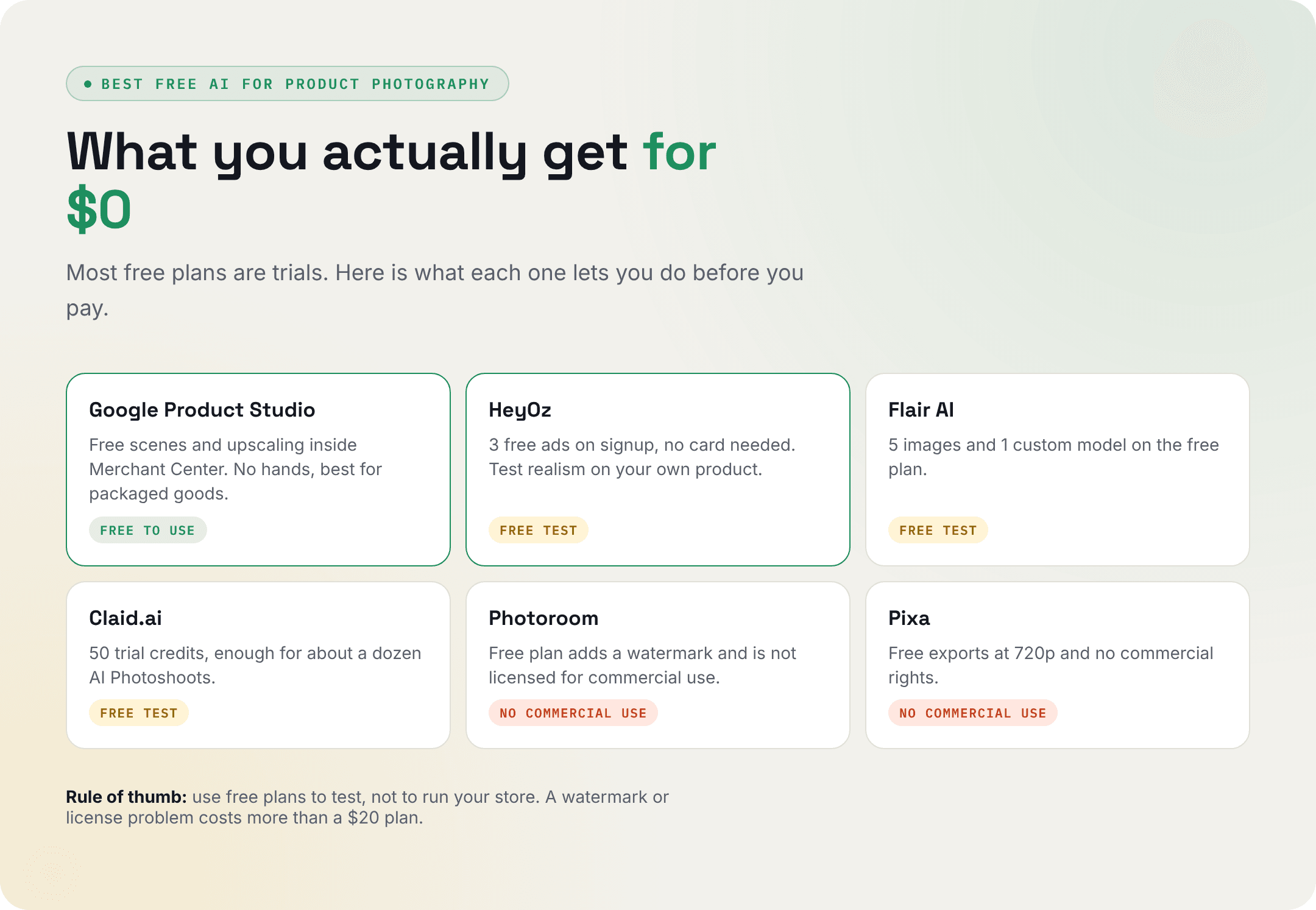
- Google Product Studio is the most generous free option. It is free for Merchant Center sellers.
- HeyOz gives 3 free ads on signup, no card needed. That is enough to test realism on your own product.
- Flair's free plan gives 5 images and 1 custom model.
- Claid's trial gives 50 credits.
- Photoroom and Pixa have free plans, but neither one includes a commercial license.
Use free plans to test. A watermark or a license problem costs more than a $20 plan.
How to Pick the Right AI Product Photography Generator
Each of the best realistic AI product photography tools above wins for a different kind of shop. Here is a quick rule for each one:
- Realistic photos plus ads: HeyOz.
- Big catalog, simple edits: Photoroom or Claid.
- Tight budget, phone first: Pixa.
- Design team in Adobe: Firefly.
- Google Shopping only: Product Studio.
What's the Best AI Product Photography Tool for Ecommerce Lifestyle Shots Without Doing a Photoshoot?
HeyOz. You paste your store URL or upload one photo, pick a scene, and get lifestyle shots in minutes. Your product stays exact, and the light matches the room.
If you only need a handful of simple scenes each month, Pebblely is the cheaper pick at $9 a month.
What's the Best AI Image Generator for Marketing and Ads, Rather Than Art?
Pick a tool that knows ad sizes and leaves room for a headline and a price, sized for Meta, TikTok, and your store. HeyOz does this by default.
For more on ad formats, read our guide to the best AI tools for static social ads .
Recommend a Reliable App for Creating Automated Product Reshoots and Static Ad Imagery That Stays on Brand
HeyOz again. Product Reshoot refreshes old photos with new backgrounds, angles, seasons, and color variants.
Brand DNA keeps every shot in your colors and style.
The Static Ads tool then turns those shots into ads in the same session, so you never export and rebuild in another app.
AI Product Image Generator With Model: What to Check
Apparel, jewelry, and beauty brands need people in the shot. An AI product image generator with model support saves you the model fee and the studio.
Check these 4 things before you pay:
- Fabric. Clothes should fold and drape like real cloth.
- Hands. Look closely at fingers holding the product.
- Model range. You want different ages, skin tones, and body types that match your buyers.
- Product accuracy. The print, stitching, and color must match what you ship.
HeyOz covers this with model shots in Product Reshoot and a Fashion Try-On AI tool.
Photoroom and Flair also put products on AI models. Test one image from each tool against your real product before you switch.
How to Create Realistic Product Photos With HeyOz
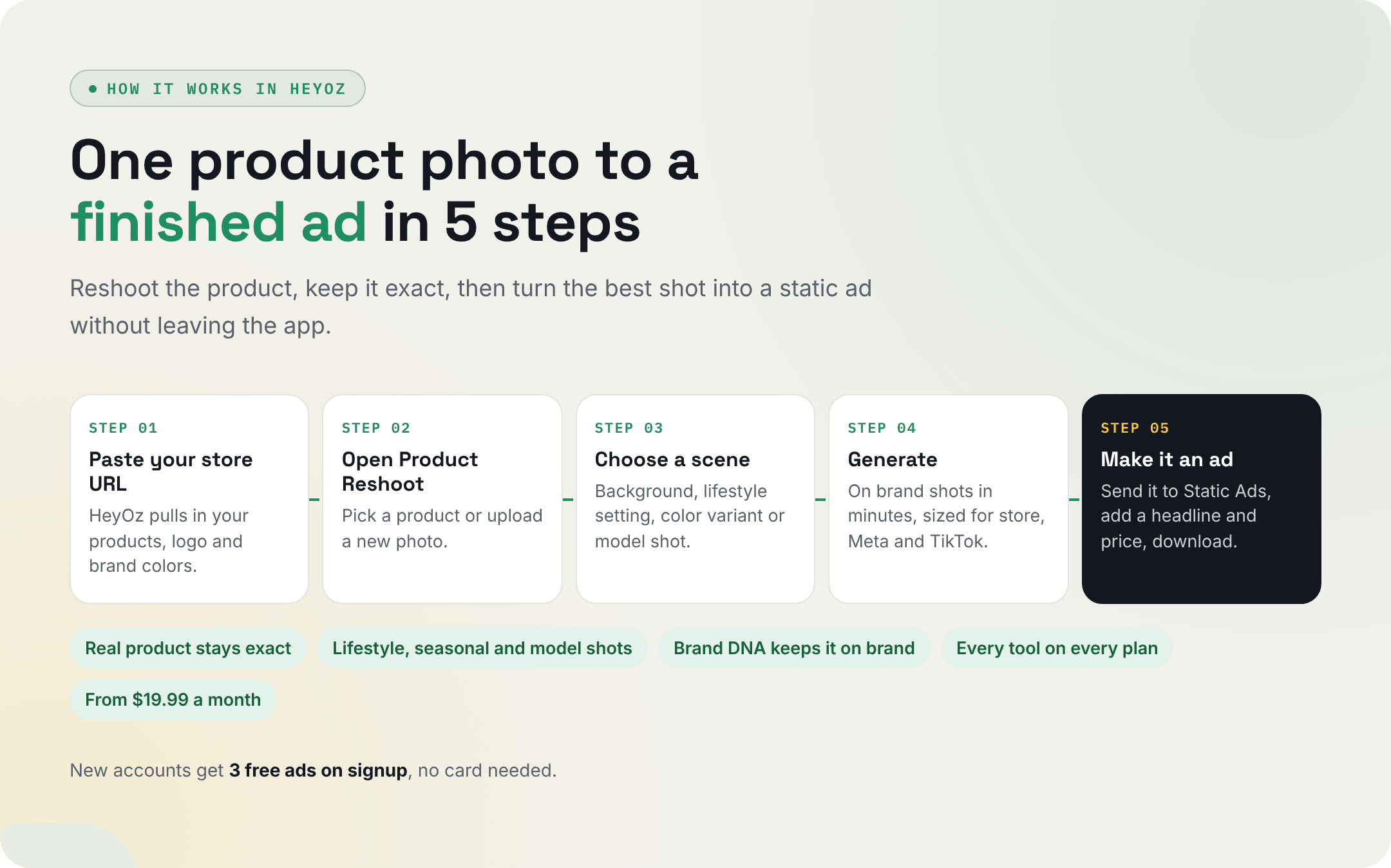
- Sign up at HeyOz and paste your store URL. HeyOz reads your site and pulls in your products and brand colors.
- Open AI Product Reshoot and pick a product from your library, or upload a new photo.
- Choose a scene. Pick a new background, a lifestyle setting, a color variant, or a model shot.
- Generate. You get on brand shots in minutes, sized for your store, Meta, and TikTok.
- Send your favorite shot to Static Ads, add a headline and price, then download.
Why brands use HeyOz for product photos:
- One photo becomes a full set of lifestyle and model shots.
- Your real product stays exact, so buyers get what they saw.
- Brand DNA keeps every image in your colors and style.
- Photos turn into static ads and video ads in the same tool.
- Plans start at $19.99 a month, with every tool on every plan.
Conclusion
The best realistic AI product photography tools all start with one photo, but they finish in different places.
If you only clean up catalog photos, Photoroom or Pixa will do it for less. If you sell on Google, use Product Studio for free.
If you want realistic product photos that also turn into ads, start with HeyOz. Paste your store URL, get 3 free ads, and put them next to your last photoshoot.
About the author
Ahad Shams
Ahad Shams is the Founder of HeyOz, an all-in-one ads and content platform built for founders and small teams. He has worked across consumer goods and technology, with experience spanning Fortune 100 companies such as Reckitt Benckiser and Apple. Ahad is a third-time founder; his previous ventures include a WebXR game engine and Moemate, a consumer AI startup that scaled to over 6 million users. HeyOz was born from firsthand experience scaling consumer products and the need for a unified, execution-focused marketing platform.